Designing multi-level sales territories: regions, districts and reps
A national sales plan and a rep's daily territory answer different questions. A useful hierarchy connects them without counting every account several times. Start with an explicit roster, then use the map to check whether the geography matches the reporting structure.
Define what each level owns
A simple hierarchy might be region → district → rep territory. The region is a management view, the district coordinates a group of territories, and the leaf territory is the smallest unit receiving account assignments. These names are choices for your organization, not fixed geographic categories.
Keep the territory ID independent of the rep's name. When a person changes roles, the territory can keep its history. Add owner and effective-date columns to the roster instead of renaming every account assignment.
Create the hierarchy roster first
| Leaf territory | District | Region | Annual potential (USD) | Annual visit hours |
|---|---|---|---|---|
| N-01 · North core | D-N · North district | R-CO · Colorado | 240,000 | 40 |
| N-02 · North outer | D-N · North district | R-CO · Colorado | 300,000 | 45 |
| S-01 · South core | D-S · South district | R-CO · Colorado | 180,000 | 35 |
| S-02 · South outer | D-S · South district | R-CO · Colorado | 280,000 | 40 |
The download is a fictional planning roster with illustrative totals. It is not an account-location file or a set of geographic boundaries. It lets you practice the parent relationships before linking them to real account assignments.
In a strict tree, each leaf territory has one district and each district has one region. If your business has overlapping product teams, keep each team's hierarchy separate. An account can legitimately appear in two team views without becoming two accounts in a company-wide total.
Use separate boundary layers for separate levels
Build or import the leaf territories into one territory layer. Keep district and region outlines in their own layers. Give each shape a name that includes its stable ID, such as N-01 · North core. This makes an exported geographic match easier to join to the roster.
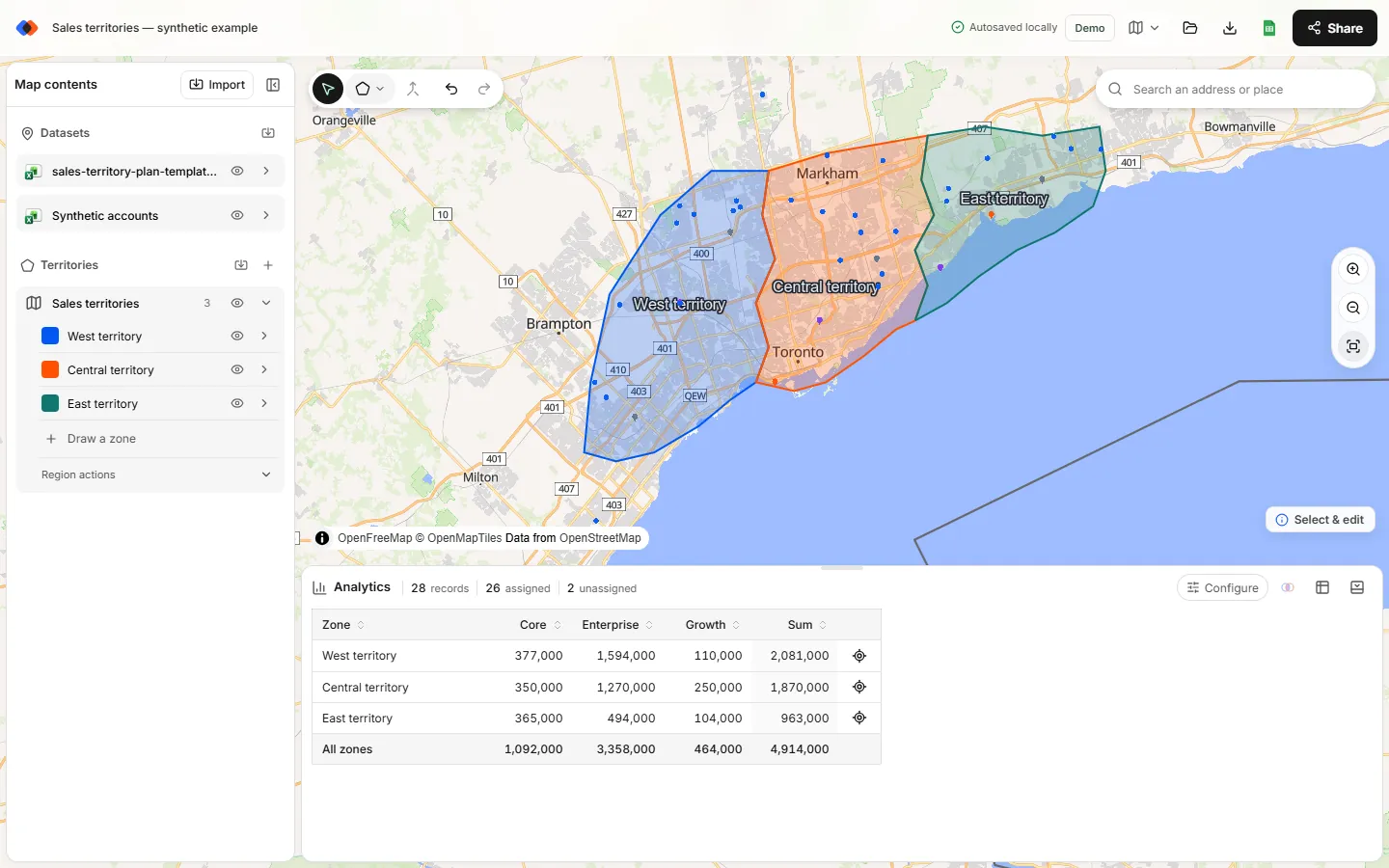
TerritoryKit lets you choose the account dataset and territory layer in Analytics. Select the leaf layer to inspect operational coverage, then select the district layer to inspect a management view. It does not automatically store parent–child relationships or synchronize a parent's shape when a child changes. Maintain the roster in your spreadsheet and review parent boundaries after changes.
Distinguish intended nesting from accidental overlap
A rep territory sitting inside a district is expected. Two rep territories covering the same account may require a decision. If you put the region, district and rep boundaries into one analysis layer, an account can match all three and look like an overlap even though the hierarchy is intentional.
Check overlaps within each operational level. Then inspect whether child areas fit their parent coverage. Keep geographic exceptions explicit: a named account can belong to a team outside its surrounding territory, but the assignment rule should say so.
Reconcile the rollup
In the fictional roster, North district has $540,000 of annual potential and 85 visit hours. South district has $460,000 and 75 hours. Colorado therefore has $1,000,000 and 160 hours. The region total comes from its four unique leaves, not from adding the leaves, districts and region together.
For account-level data, first resolve zero and multiple geographic matches. Join each approved leaf assignment to the roster by territory ID. Then group the same unique account-site records by district and region. A pivot table can sum additive measures such as visit hours; rates need their underlying numerators and denominators rather than an average of child percentages.
Check three conditions: every assigned leaf exists in the roster, every required parent exists, and the sum of mutually exclusive children equals the parent's account-derived total. Keep unassigned accounts visible as a separate group while you resolve them.
Test a change at both levels
- Save a baseline roster, account list and map backup.
- Change one leaf boundary or parent relationship.
- Export leaf membership and identify moved account-site IDs.
- Recalculate district and region totals from those assignments.
- Check adjacent leaf territories for gaps and overlaps.
- Record the owner decision and effective date before replacing the baseline.
A child can move to a different district without changing its geographic boundary. A boundary edit can move accounts without changing the district roster. Treat these as different changes so a reviewer can explain the result.
When to keep the structure simpler
If every district contains only one territory, the extra level may add administration without answering a new question. If managers need only a monthly summary, a spreadsheet parent column may be enough. Add a map layer when its geography helps a real coverage or review decision.
For the underlying inputs, use the planning data checklist. For a worked account handover, follow the territory realignment review.
FAQ
Does TerritoryKit create territory hierarchies automatically?
No. It supports separate territory layers and geographic analysis. Maintain parent–child IDs in your roster and use exported membership to calculate hierarchy totals.
Why does an account show several territory matches?
It may fall in overlapping boundaries. If several hierarchy levels are in the same layer, nesting can also create multiple matches. Analyze the intended operational level separately.
Can an account belong to two product teams?
Yes, if that is your business rule. Keep team-specific assignments separate and deduplicate account IDs for a company-wide account count.
Does changing a child territory update its parent boundary?
No. Review the corresponding parent geometry and roster after editing a child; there is no automatic parent-boundary synchronization.
Related guides
Build your first territory map
Bring your account list, draw the territories you need, and see the results as the map changes. Your first map is free.
Open Map Builder