Sales territory design: principles, steps and examples
Territory design decides who sells where. Get it right and reps spend their time selling instead of driving, every territory has a fair shot at quota, and customers know who to call. This guide covers the decisions behind a good design, a step-by-step process for planning territories on a map, and three examples you can adapt.
Quick answer
To design sales territories:
- Pick a coverage model: geographic, named accounts, industry, or a hybrid.
- Choose a building block: ZIP codes, counties, states or custom-drawn areas.
- Choose a balance measure: account count, revenue potential or workload.
- Draw a first design around your accounts and reps' home bases.
- Test it against shape rules: compact, contiguous, sensible borders.
- Rebalance and document exceptions before rollout.
Territory design, planning and alignment
These terms overlap, and teams use them loosely. A useful distinction:
| Term | What it means | When it happens |
|---|---|---|
| Territory design | The structure: how territories are defined, sized and shaped | When building a sales team or changing the coverage model |
| Territory planning | The full process, from goals and data to assignments and rollout | Usually yearly, ahead of quota setting; see the territory plan template |
| Territory alignment | Adjusting existing boundaries and assignments to rebalance | After hires, departures or big shifts in the market |
| Territory planner | The person or the tool doing the planning, often a sales operations role | Year-round |
Decision 1: Choose a coverage model
| Model | How accounts are split | Best for |
|---|---|---|
| Geographic | By where the account is | Field sales, distributors, service teams; any role with travel |
| Named accounts | A specific list per rep, regardless of location | Enterprise sales with a few large, complex customers |
| Industry or vertical | By the account's industry or segment | Products that need deep domain knowledge |
| Hybrid | Named accounts first, then geography for everyone else | Most growing teams |
Even named-account and industry teams benefit from a map: it shows travel load, clusters worth a visit trip, and accounts nobody owns. A map is essential for geographic and hybrid models.
Decision 2: Choose the geographic building block
| Building block | Strengths | Trade-offs |
|---|---|---|
| ZIP codes | Familiar, fine-grained, easy to write into CRM rules | ZIPs change and aren't official shapes; see ZIP code territories |
| Counties | Stable, official boundaries; good for rural coverage | Large western counties can be too big to split fairly; see state and county territories |
| States or provinces | Simple to explain and administer | Too coarse for most field teams; metro areas cross state lines |
| Custom-drawn areas | Follow real travel patterns, highways and customer clusters | Need a clear owner list for CRM rules; see drawing territories |
Pick the smallest block your systems can handle. Finer blocks make balancing easier, because you can move a ZIP code instead of a whole county.
Decision 3: Choose how you'll measure balance
Territories should offer similar opportunity and a workload one person can cover, not identical account counts. Most teams balance on revenue potential or workload and use account count and travel as checks. Whatever you choose must be a column in your account list so the map can total it. The territory balancing guide explains each measure and how to set a tolerance band, such as every territory within 15% of the average.
Decision 4: Apply shape rules
- Contiguous: one connected piece. Detached islands are tolerable only for named-account exceptions.
- Compact: roughly round or square rather than long and thin, so drive times stay short.
- Anchored: the rep's home base or office sits near the middle.
- Sensible borders: follow highways, rivers and mountain ranges that affect travel, rather than cutting across them.
- Whole markets: avoid splitting a small city or a single large customer's campus between reps.
Decision 5: Decide how to handle exceptions
Write the rules down before drawing, or every edge case becomes a negotiation:
- Named and house accounts that stay with a specific rep regardless of location.
- Overlaps: whether shared coverage is allowed, and who owns the account when it is.
- Multi-location customers: owned by headquarters location, or by each site.
- Unassigned areas: covered by inside sales, a partner, or nobody yet.
- Account continuity: when an account moves territories, whether the relationship moves with it.
Step by step: design territories on a map
Map accounts and reps
Import your account list into the map builder with latitude, longitude and your balance measure. Add rep home bases as a second point layer so you can see where each territory should center.
Draw or build a first design
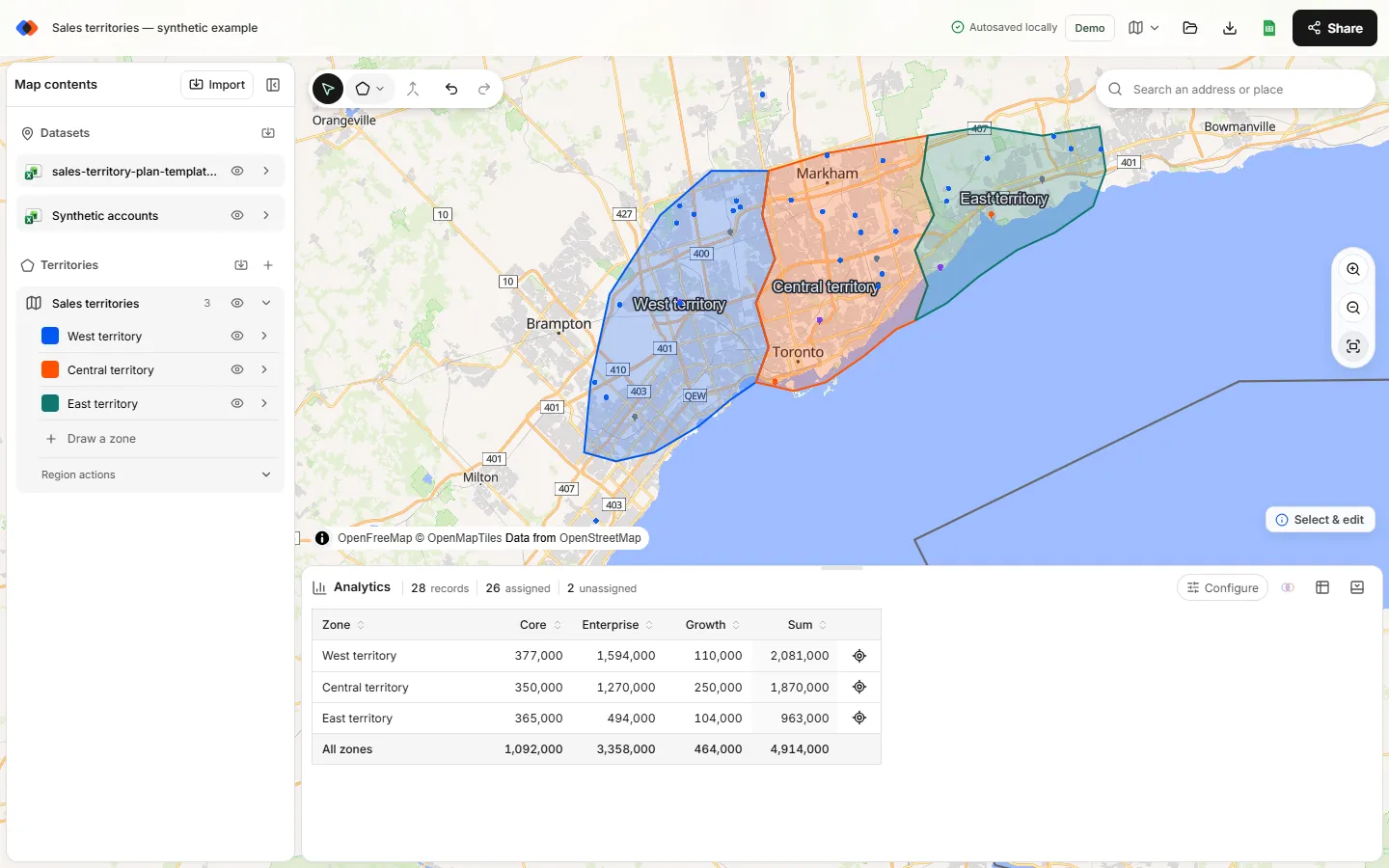
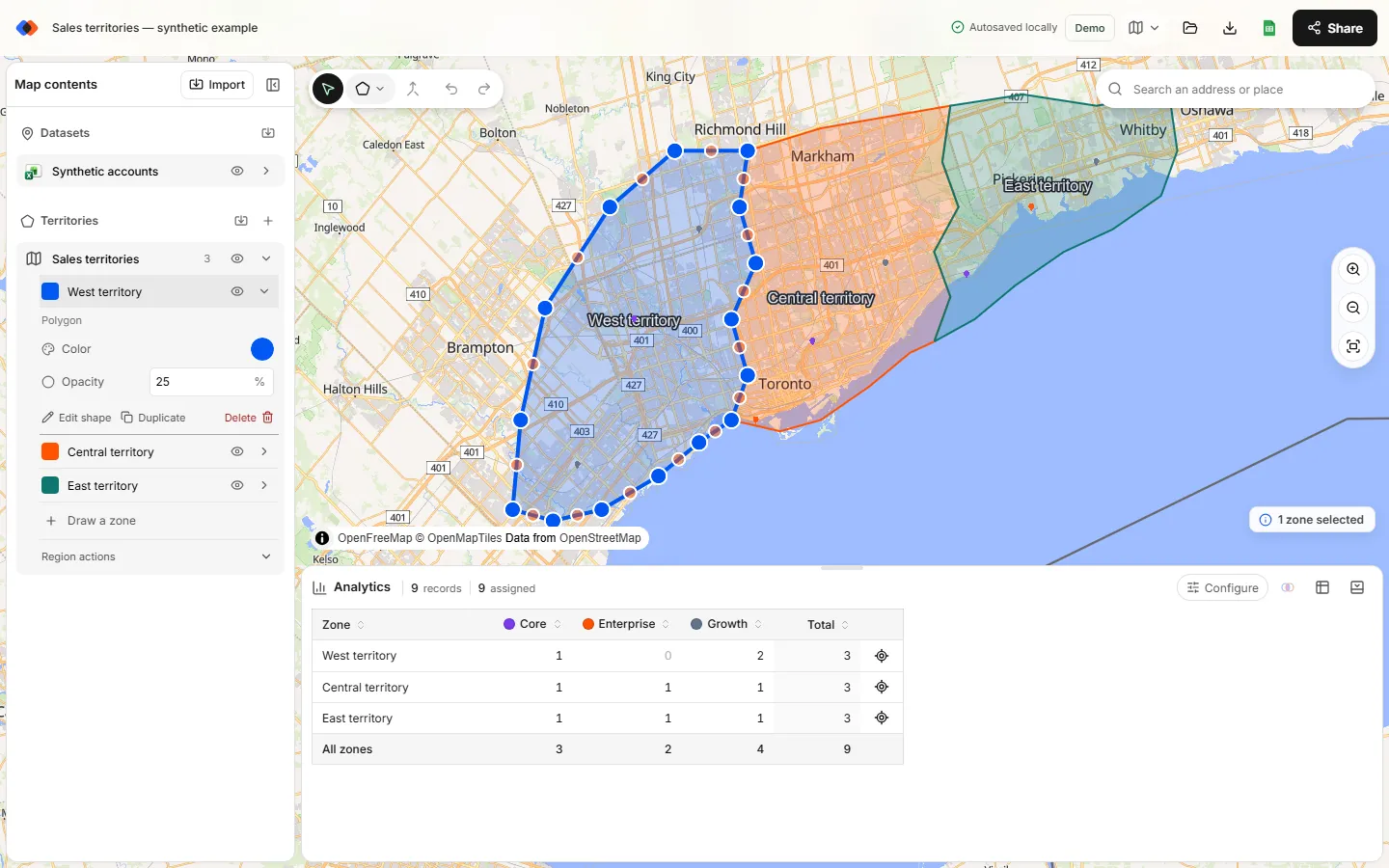
Draw one shape around the whole market and split it with Line cut so neighbors share borders exactly. If your building block is ZIP codes or counties, import those boundaries and merge them into territories instead.
Measure every territory
In Analytics, choose your accounts under Dataset and your territories under Territories, then set the measure to the sum of potential or workload. Add a breakdown by segment to check the account mix.
Adjust the extremes
Move the border between the heaviest territory and its lightest neighbor, one change at a time. Totals update after each edit.
Check shape and exceptions
Look for stretched shapes, detached pieces, accounts in two territories and accounts in none. Fix them or record why they're intentional.
Document and share
Export point membership so every account has a territory value for your CRM, and share the live map with reps and managers. See assigning accounts to territories.
Three territory design examples
These examples use illustrative numbers to show how the decisions above play out. Adapt the structure, not the figures.
Example 1: Four field reps, one state, county-based
A building-products distributor covers one state with four outside reps. Contracts and reporting are by county, so counties are the building block. The planner imports county boundaries, merges them into four territories around each rep's home city, and balances on annual potential.
| Territory | Counties | Accounts | Annual potential | vs average |
|---|---|---|---|---|
| North | 14 | 212 | $4.1M | +3% |
| Metro | 3 | 298 | $4.4M | +10% |
| South | 19 | 167 | $3.6M | −10% |
| West | 22 | 141 | $3.9M | −3% |
The average is $4.0M per territory. Metro has the most accounts in the fewest counties because travel is short. Metro and South both sit outside a ±8% band, so the planner moves a suburban county worth about $0.4M from Metro to South, which brings both to roughly $4.0M.
Example 2: Metro and rural split
A medical-supply team has a dense metro area and a large rural region. Instead of equal areas, the design gives the metro two small territories with many accounts and the rural region one large territory with fewer, higher-value accounts. Workload, measured as visits per year times hours per visit, is the balance measure, so the rural rep's drive time counts.
Example 3: Hybrid with named accounts
A software company assigns its 25 largest customers to two key-account managers as named accounts, wherever they are. Everyone else is covered by five geographic territories built from ZIP codes. On the map, named accounts are a separate point layer, so they don't distort the geographic totals, and the planner checks that no geographic rep has more than their share of the remaining potential.
Common territory design mistakes
- Balancing on account count alone. A rep with 150 small accounts and a rep with 150 enterprise accounts don't have the same job.
- Designing around current reps' preferences. Design for the market first, then assign people.
- Ignoring travel. Equal potential is meaningless if one territory takes three hours to cross.
- Redesigning too often. Customers and reps lose relationships. Most teams realign yearly and make small mid-year fixes only for hires and departures.
- Leaving gaps. Every unassigned account is revenue nobody is chasing.
FAQ
What is sales territory design?
Sales territory design is deciding how a market is divided among salespeople: the coverage model, the geographic building blocks, the balance measure and the shape of each territory.
What makes a good sales territory?
A good territory offers a fair share of opportunity, a workload one rep can cover, a compact and connected shape with the rep based near the middle, and clear rules for exceptions.
How many accounts should a sales territory have?
It depends on account size and visit frequency. Work out the hours each account needs per year, divide a rep's available selling hours by that, and use the result as a starting range rather than a fixed number.
How often should sales territories be redesigned?
Most teams review territories yearly before quota setting and make small adjustments when reps join or leave. Full redesigns are usually reserved for changes in strategy or coverage model.
What is a territory planner?
A territory planner is the person, often in sales operations, or the tool that designs territories and assigns accounts. A map-based planner shows how each boundary change affects the numbers.
Related guides
Build your first territory map
Bring your account list, draw the territories you need, and see the results as the map changes. Your first map is free.
Open Map Builder