How to make a territory map by state or county
Plenty of territory plans are written by state or county: “North covers these 14 counties.” This guide shows how to turn that kind of plan into an editable territory map with free U.S. Census Bureau boundaries, including how to split one county that's too big for a single rep.
Quick answer
- Download state or county boundaries from the U.S. Census Bureau's cartographic boundary files.
- Keep only the states or counties in your plan, for example in QGIS, and save them as KML with the name as each shape's label.
- Import the KML into a territory map maker such as TerritoryKit.
- Select the counties or states for each territory and merge them.
- Import your accounts and count them per territory.
If you only need a colored picture and don't need counts, an Excel map chart can shade counties or states by territory name instead.
States or counties: which should you use?
| Building block | Use it when | Watch out for |
|---|---|---|
| States | Territories are regional, such as a rep per region or a distributor per state group | Too coarse for field reps; metro areas cross state lines |
| Counties | Field teams, rural coverage, or contracts and reporting written by county | Some counties are huge or very dense; plan to split a few |
| ZIP codes | You need finer control or your CRM routes leads by ZIP | More areas to manage; see ZIP code territories |
Where to get free state and county boundaries
The U.S. Census Bureau publishes cartographic boundary files for states and counties, simplified for mapping and free to use. Each comes at several resolutions:
| Resolution | Detail | Good for |
|---|---|---|
| 1:500,000 | Most detailed | County territories you'll zoom into |
| 1:5,000,000 | Medium | State and regional maps |
| 1:20,000,000 | Lightest | National overview maps of states |
Download the shapefile or KML for states or counties. The files cover the whole country. Every county has a five-digit GEOID, its FIPS code: two digits for the state and three for the county. Use it to match counties to your plan, because county names repeat: about 30 states have a Washington County.
Build county territories step by step
Open the county file in QGIS
QGIS is free for Windows, macOS and Linux. Choose Layer → Add Layer → Add Vector Layer and open the county shapefile.
Keep your counties
Use Select Features by Expression.
"STATEFP" = '08'selects every county in Colorado;"GEOID" IN ('08031','08005')selects a list. Your plan's county list, with FIPS codes, makes this quick.Export as KML
Right-click the layer, choose Export → Save Selected Features As, pick KML and set the name field to the county name column,
NAME. Each county will import with its name as the label.Import into the map builder
In the map builder, choose Import and add the KML. Each county becomes its own zone.
Merge counties into territories
With the select tool, Ctrl-click (Cmd-click on a Mac) or Shift-click the counties for one territory, then choose Merge selected zones. Rename it and pick a color. Repeat for each territory.
Add your accounts
Import your account list with latitude and longitude, then open Analytics and pick the accounts under Dataset and your territories under Territories to count, sum and check overlaps. No coordinates yet? See addresses to latitude and longitude.
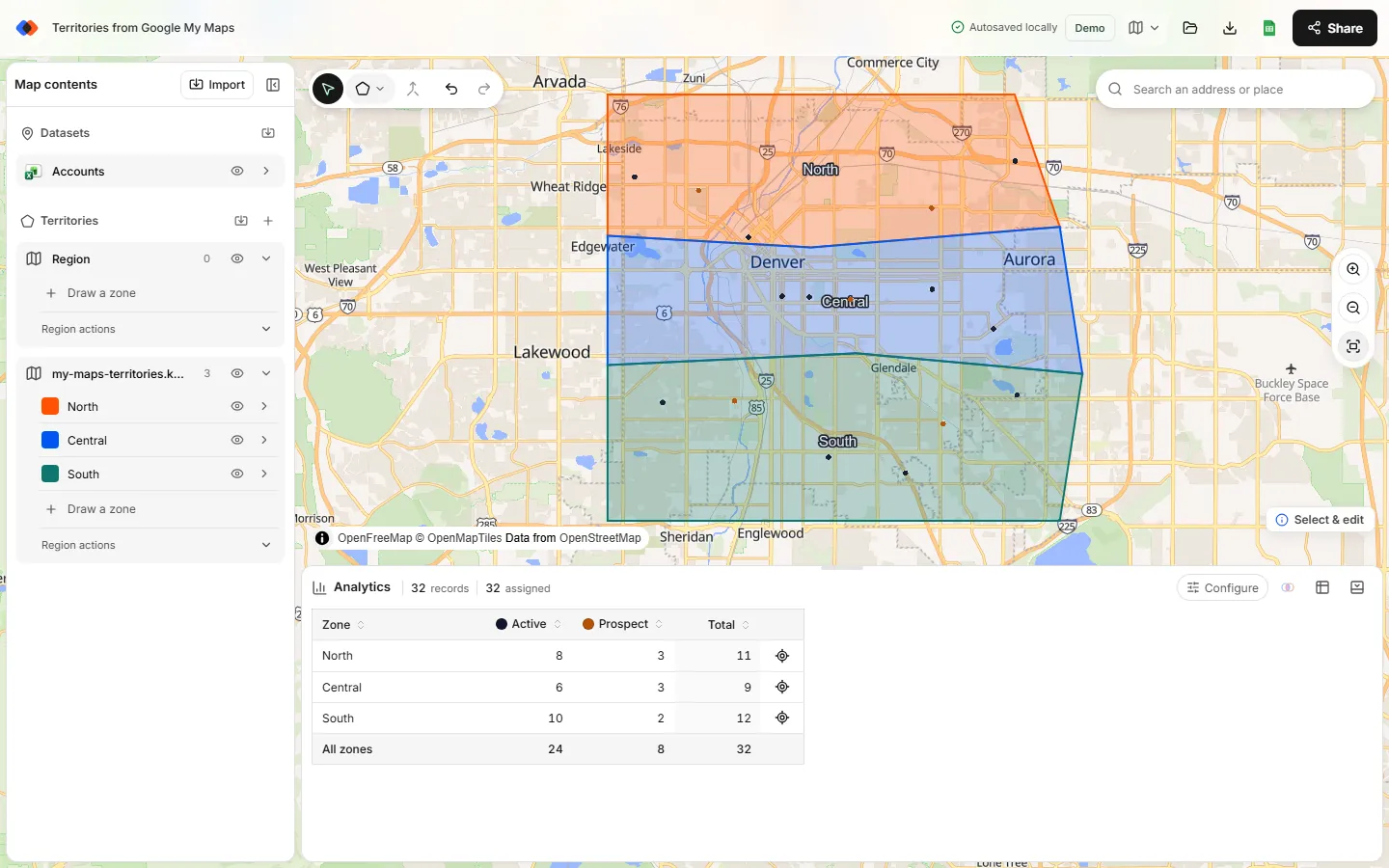
Splitting a county between two territories
Dense metro counties often hold more accounts than one rep can serve. To split one:
- Merge the county into the territory that should own most of it.
- Select that territory and choose Line cut from the draw tools.
- Draw a line that starts and ends outside the territory, crossing the county along a highway or river, then press Enter. The territory splits into two pieces along the line.
- Rename the main piece back to the territory name, then select the cut-off piece with the neighboring territory and merge them.
Document the split with the road or landmark it follows, so the rule still makes sense in your CRM, which probably assigns by county or ZIP code. If splits become common, ZIP codes may be the better building block.
Build state territories
State territories work the same way with the state boundary file. Use the lightest resolution that looks right at your zoom level, merge states into regions such as “Northeast” or “Mountain”, and import your accounts to compare regions. Many national teams combine both: state-level regions for managers and county-level territories for reps.
Shading counties or states without a map tool
If all you need is a picture, Excel's filled map chart (Microsoft 365) can color states or counties by a territory name column. Include state names next to county names so Excel can tell the two Washington Counties apart. Map charts can't plot account locations, count accounts per territory or split a county. See sales territory mapping in Excel.
Tips for county and state territory maps
- Match on FIPS, not names. GEOID avoids duplicate and misspelled county names.
- Keep files small. Import only the counties you plan; all 3,000-plus U.S. counties slow down any browser map.
- Check the border accounts. Simplified boundaries are approximate, so review accounts near county lines after merging.
- Check unassigned accounts. Accounts outside every territory usually mean a county is missing from your plan.
FAQ
How do I create a sales territory map by county?
Download Census county boundaries, keep the counties in your plan, save them as KML, import them and merge the counties for each territory. Then import your accounts to count them per territory.
Where can I get free county boundaries?
The U.S. Census Bureau's cartographic boundary files include free county and state boundaries in shapefile and KML formats at several resolutions.
Can a territory include counties from different states?
Yes. Select counties from any state and merge them; the territory doesn't need to follow state lines.
Can I split one county between two territories?
Yes. Merge it into one territory, cut it with the Line cut tool along a road or river, and merge the cut-off piece into the neighboring territory.
Should I build territories from ZIP codes or counties?
Counties are stable and simple, which suits rural and county-contract teams. ZIP codes give finer control in dense areas and match most CRM routing rules. See sales territory design for the trade-offs.
Related guides
Build your first territory map
Bring your account list, draw the territories you need, and see the results as the map changes. Your first map is free.
Open Map Builder