How to convert addresses to latitude and longitude for free
Most territory maps start with an address list, but mapping tools place points by coordinates. Here's how to geocode a spreadsheet of addresses for free, check the results, and avoid the column-order mistake that sends points to Antarctica.
Quick answer
For U.S. addresses, upload a CSV to the U.S. Census Bureau's free Census Geocoder using its batch option: up to 10,000 addresses and 5 MB per file. It returns each address with a match status and a coordinate pair. Split that pair into separate longitude and latitude columns, fix the rows that didn't match, and import the list into your mapping tool. Outside the U.S., use a geocoding service whose terms allow batch use and storing results.
What geocoding does
Geocoding turns address text into latitude and longitude. Results come at different levels of precision:
- Rooftop or parcel: the building itself. Commercial geocoders often offer this.
- Interpolated street address: an estimated position along the street segment, based on the segment's address range. This is how the Census Geocoder places addresses.
- Postal code or city centroid: one point for a whole area. Useful when the street address is missing; see ZIP code territory maps.
For territory planning, interpolated street positions are usually more than precise enough, because territories are far larger than the error.
Option 1: The free Census Geocoder (U.S. addresses)
Prepare the batch file
Create a CSV with no header row and exactly five columns in this order: unique ID, street address, city, state, ZIP. Use your account ID as the unique ID so you can join results back later. Split lists over 10,000 rows into several files.
Upload it
Open the Census Geocoder, choose the address batch option under Find Locations Using…, pick the current benchmark (Public_AR_Current), upload the file and submit. The results download as a CSV.
Read the results
Each row returns the ID, the input address, a match status (
Match,No_MatchorTie), a match type (ExactorNon_Exact), the matched address, a coordinate pair, a street segment ID and the side of the street.Split the coordinates
The coordinate column holds longitude first, then latitude, for example
-77.035,38.898. In Excel, use Data → Text to Columns with a comma delimiter, or=TEXTBEFORE(F2,",")for longitude and=TEXTAFTER(F2,",")for latitude. Name the new columnslongitudeandlatitude.Fix what didn't match
Filter for
No_MatchandTie. Typical causes are typos, missing ZIPs, PO boxes, suite numbers inside the street field, and brand-new streets. Correct them and run only those rows again.Join the coordinates back
Look up the coordinates by ID into your master list. If you split them into new columns I (longitude) and J (latitude) of the results sheet, use
=XLOOKUP(A2,Results!A:A,Results!J:J,"")for latitude and the same formula withResults!I:Ifor longitude. Column H of the Census output is the side of the street, not a coordinate.
| ID | Input address | Match | Type | Matched address | Coordinates |
|---|---|---|---|---|---|
| 1 | 4600 Silver Hill Road, Washington, DC, 20233 | Match | Exact | 4600 SILVER HILL RD, WASHINGTON, DC, 20233 | -76.92836638093,38.84505589808 |
| 2 | 1600 Pennsylvania Avenue NW, Washington, DC, 20500 | Match | Exact | 1600 PENNSYLVANIA AVE NW, WASHINGTON, DC, 20500 | -77.035189204737,38.898702605246 |
| 3 | 1 Nowhere Lane, Nowhere, ZZ, 00000 | No_Match |
Option 2: Commercial geocoders and spreadsheet add-ons
For addresses outside the U.S., rooftop precision, or very large lists, use a commercial geocoding API or a spreadsheet add-on built on one. Before you choose, check:
- Terms of use. Some services don't allow storing results or using them on another provider's map.
- Volume limits and price per thousand addresses.
- Match quality fields, so you can find low-confidence results.
- Coordinate order in the output, for the reason above.
Option 3: A handful of addresses by hand
For a few locations, look up each address in an online map and copy the coordinates. In Google Maps on a computer, right-click the location and select the latitude and longitude shown at the top of the menu to copy them. TerritoryKit's address search moves the map to an address or place, but it doesn't add points to your data.
Check your coordinates before mapping
| Check | What good looks like |
|---|---|
| Format | Decimal degrees, such as 39.7392 and -104.9903, not degrees-minutes-seconds |
| Ranges | Latitude between -90 and 90; longitude between -180 and 180 |
| Signs | U.S. and Canadian longitudes are negative; latitudes north of the equator are positive |
| Columns | Separate, clearly named latitude and longitude columns |
| Precision | Five decimal places is about a meter; more adds nothing for territory work |
| Duplicates | One row per location; duplicates inflate territory counts |
Import the geocoded list into TerritoryKit
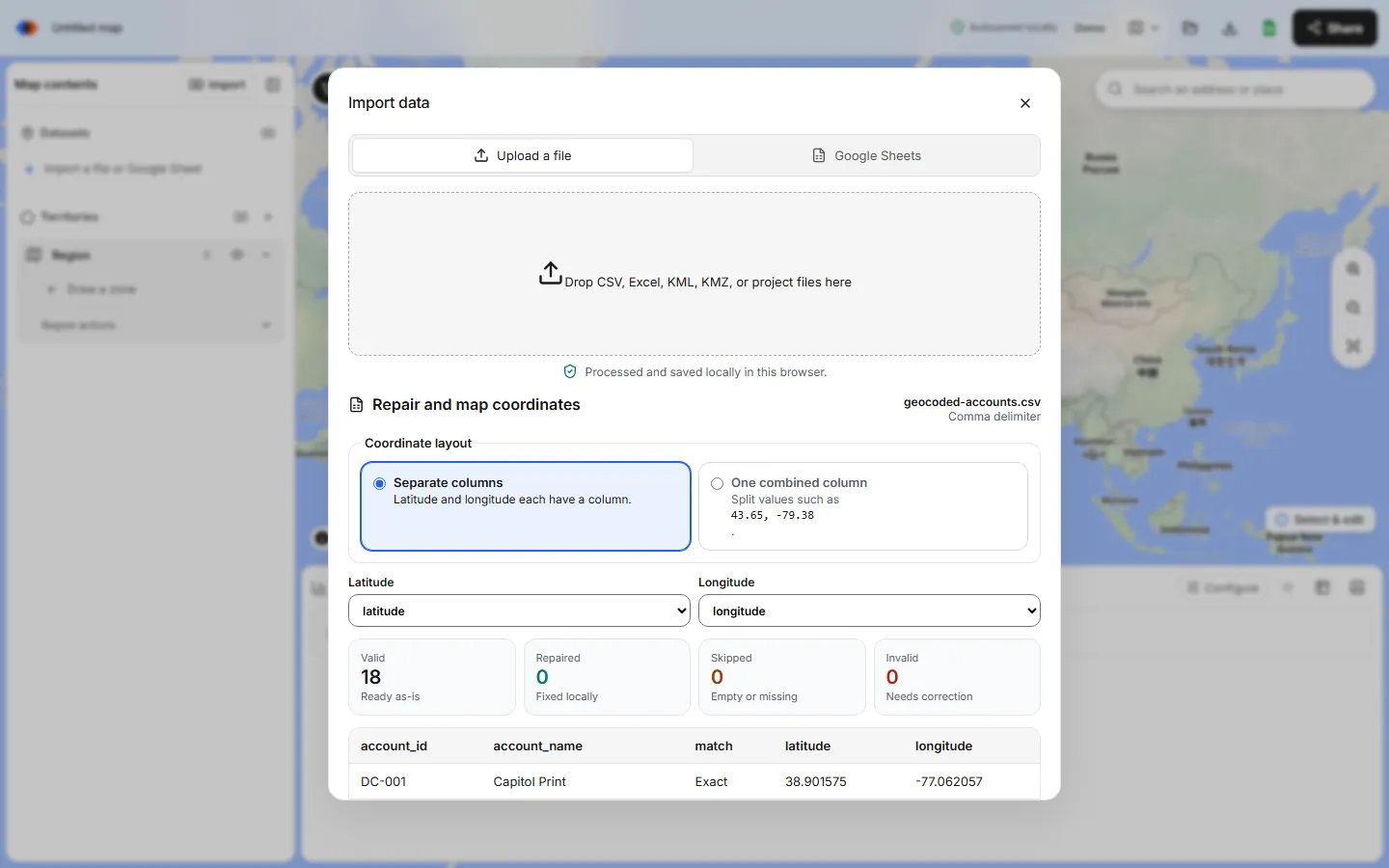
Open the map builder, choose Import and drop in the CSV or Excel file. Columns named latitude, lat, longitude, lng, lon or long are detected automatically. The import preview shows valid, repaired, skipped and invalid rows, with the reason for the first rejected rows; signed-in users can download every rejected row with its reason, which counts as one export. Then draw or import territories and count your locations in each.
Next steps: create sales territories from Excel or fix CSV and Excel import errors.
FAQ
Is the Census Geocoder free?
Yes. It's a free U.S. Census Bureau service for U.S. addresses. Batch files can contain up to 10,000 addresses and must be under 5 MB.
What order are the Census Geocoder coordinates in?
Longitude first, then latitude, in a single comma-separated column. Split them into two named columns before importing them into a map.
Can TerritoryKit geocode my addresses?
No. TerritoryKit maps spreadsheet rows that already have latitude and longitude. Its search box moves the map to an address but doesn't geocode lists.
How accurate is free geocoding?
The Census Geocoder interpolates positions along street segments, which is usually within the right block. That's plenty for territory planning, but check No_Match and Tie results by hand.
What if I only have ZIP codes?
Use ZIP-level coordinates from the Census Gazetteer file. The ZIP code territory guide shows the lookup.
Related guides
Build your first territory map
Bring your account list, draw the territories you need, and see the results as the map changes. Your first map is free.
Open Map Builder