How to plot ZIP codes on a map (free methods)
You have a spreadsheet of ZIP codes, maybe with sales, customers or jobs next to each one, and you want to see it on a map. There are two ways to plot ZIP codes: as points or as shaded areas. This guide shows both, with free data from the U.S. Census Bureau and practice files you can download.
Quick answer
- To plot ZIP codes as points: look up each ZIP's latitude and longitude in the free Census Gazetteer ZIP file, add them as two columns, and import the sheet into a map tool such as TerritoryKit.
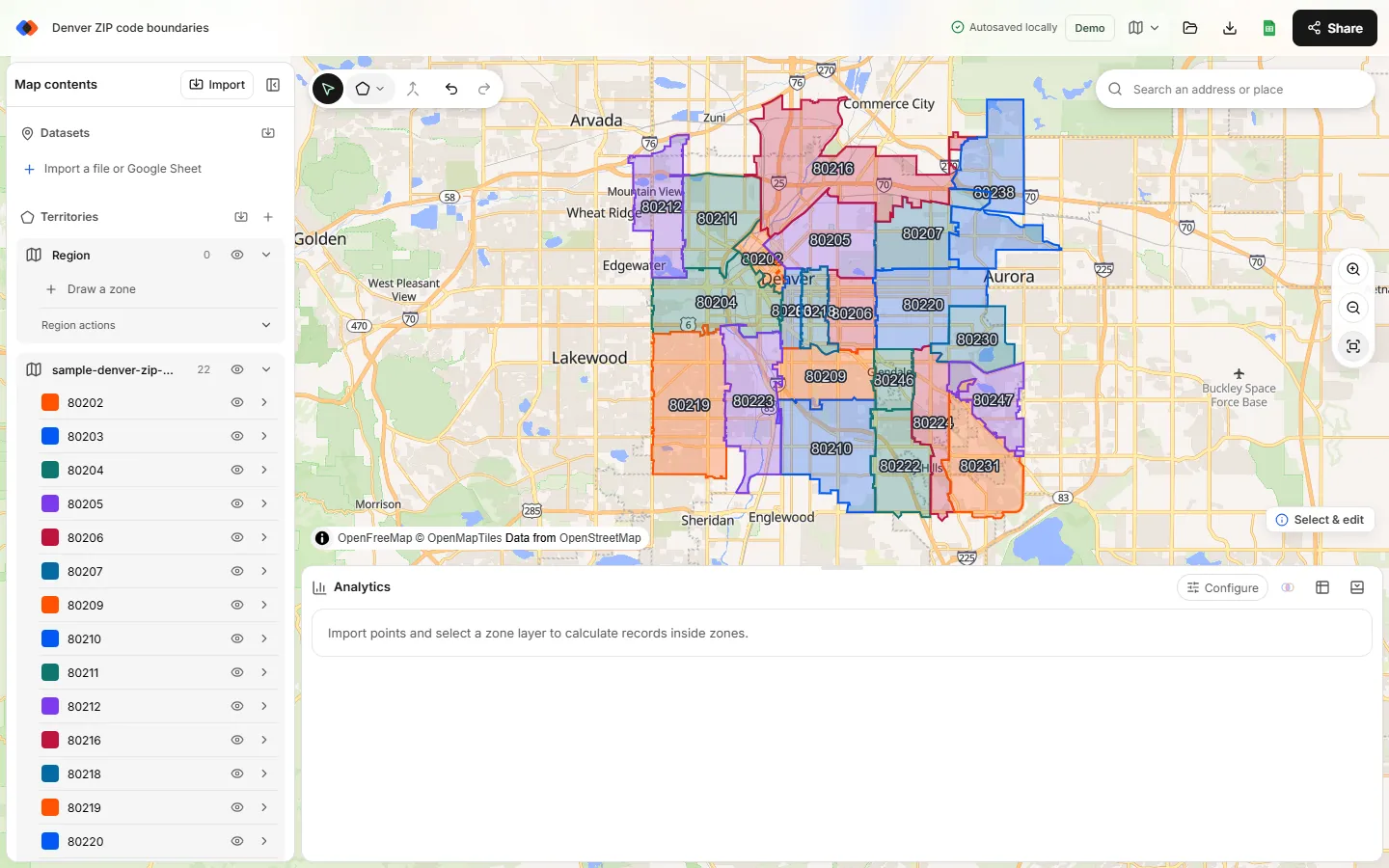
- To shade ZIP codes as areas: download ZIP boundaries (Census ZIP Code Tabulation Areas), keep the ZIPs you need, and import them as KML.
- To color ZIP codes by a value, such as sales per ZIP, an Excel map chart is the fastest free option if you have Microsoft 365.
Pick the method by what you want to learn from the map. The table below helps.
Points or shaded areas?
| You want to… | Plot ZIP codes as | Best free tool |
|---|---|---|
| See where a list of ZIP codes or customers is | Points | TerritoryKit or Google My Maps |
| Count ZIP codes or accounts inside areas you draw | Points | TerritoryKit |
| Color ZIP codes by sales, count or category | Shaded areas | Excel map chart |
| Show which ZIP codes a team or store covers | Shaded areas | TerritoryKit with ZIP boundaries |
| Group ZIP codes into sales territories | Shaded areas, then merge | TerritoryKit; see ZIP code territories |
Method 1: Plot ZIP codes as points
A point map puts one dot at the center of each ZIP code. It's the quickest way to map a long list, and it works with any tool that reads latitude and longitude. The free source for ZIP coordinates is the U.S. Census Bureau's Gazetteer file for ZIP Code Tabulation Areas (ZCTAs), which lists an internal point for every ZIP area.
Download ZIP coordinates
On the Census Bureau's Gazetteer Files page, download the national ZIP Code Tabulation Areas file and unzip it. The INTPTLAT and INTPTLONG columns hold each ZIP's internal-point latitude and longitude. To practice first, use the Denver ZIP coordinates file below.
Open it without losing leading zeros
The Gazetteer file is pipe-delimited. In Excel, use Data → From Text/CSV, choose
|as the delimiter, and set data type detection to “Do not detect data types”. Otherwise ZIPs such as 02108 become 2108 and won't match.Add latitude and longitude to your list
With the Gazetteer on a sheet named
Gazand your ZIP codes in column C, add=XLOOKUP(TEXT(C2,"00000"),Gaz!A:A,Gaz!G:G,"")for latitude and the same formula withGaz!H:Hfor longitude. UseLEFT(C2,5)first for ZIP+4 codes. With the Denver practice files, both ZIP columns are plain numbers, so=XLOOKUP(C2,Coords!A:A,Coords!B:B,"")andCoords!C:Cwork.Check the misses
Filter for blank coordinates. PO Box-only ZIPs, single-building ZIPs and very new ZIPs often have no ZCTA. Geocode those rows' street addresses instead, or drop them if they don't matter for the map.
Import and plot
Open the map builder, choose Import, and select the new latitude and longitude columns. Every row becomes a point, and any other columns, such as segment or revenue, come along for filtering and analysis.
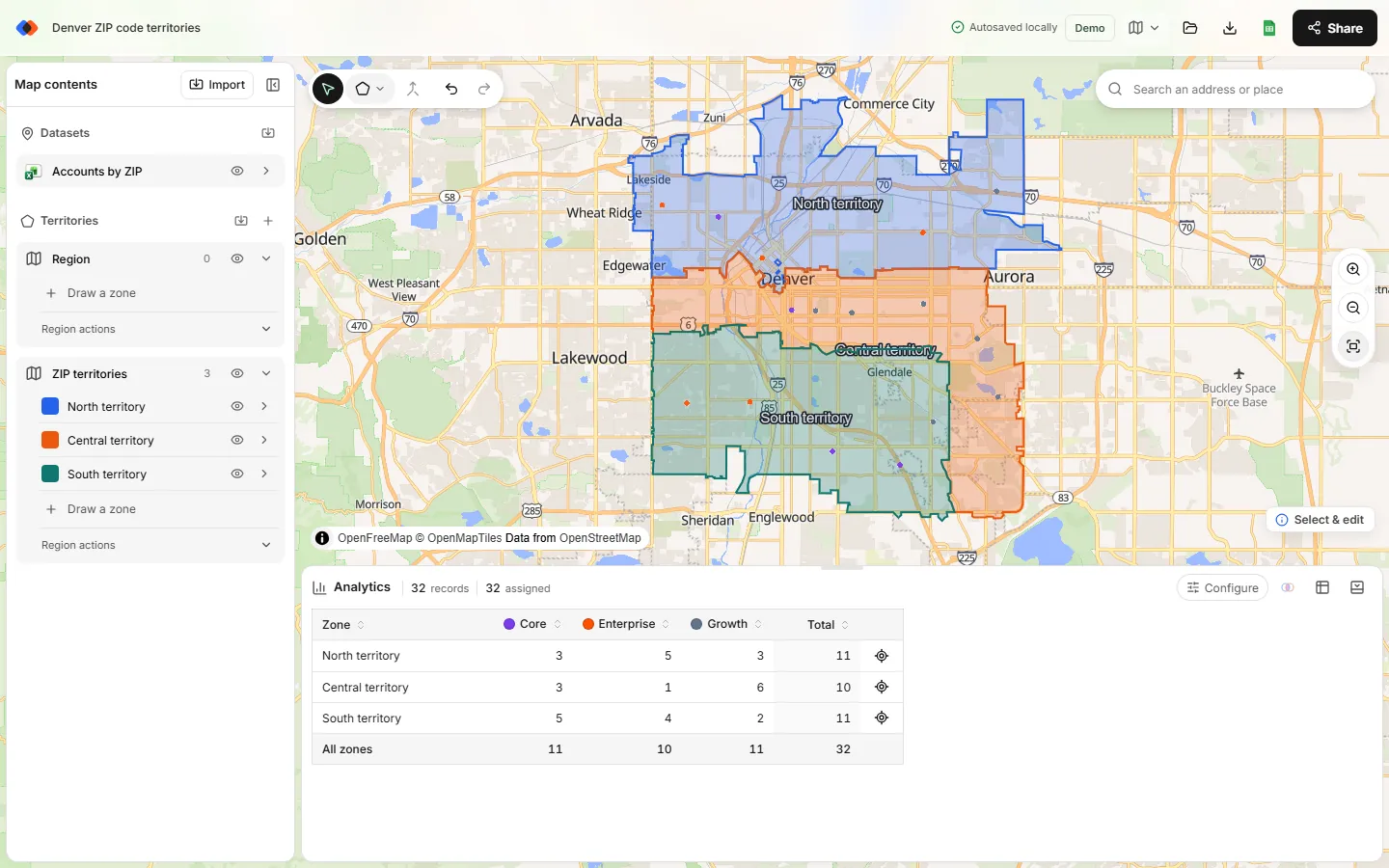
Rows that share a ZIP code share one point, so they stack. That's expected: a ZIP point stands for the whole ZIP area, not a street address. If you need each customer in its exact spot, convert addresses instead; see addresses to latitude and longitude.
Plot ZIP code data, not just ZIP codes
Most ZIP lists carry a number: sales, leads, jobs or population. Keep that column in the sheet when you import. In TerritoryKit, draw an area around a group of ZIP points and open Analytics to count the rows inside it, sum the number column, or break the total down by a category such as segment. Move the boundary and the totals update.
Method 2: Plot ZIP codes as shaded areas
To see ZIP code boundaries, you need a boundary file. ZIP codes are USPS delivery routes, not official shapes, so the standard free source is the Census Bureau's ZIP Code Tabulation Areas: approximate polygons built from census blocks. The ZIP code boundary files guide compares free and paid sources.
Download ZCTA boundaries
From the Census Bureau's cartographic boundary files, download the ZIP Code Tabulation Areas file. It covers the whole country, so it's large.
Keep only your ZIP codes
Open the file in QGIS (free), select the ZIP codes you want, for example by state or from your list, and export only the selection as KML. Set the KML name field to the ZIP column so each shape keeps its ZIP code as its name.
Import the KML
In the map builder, choose Import and add the KML. Each ZIP becomes its own zone, named by ZIP code, that you can recolor, label, select and merge.
Add your data on top
Import your account or ZIP point list as a second layer. Analytics then counts the points in each ZIP area and flags points outside every ZIP you imported.
Method 3: Shade ZIP codes in an Excel map chart
With a Microsoft 365 subscription, Excel can shade postal codes without any coordinates:
- Put ZIP codes in one column and a value or category in the next. Add a country column containing “United States” to reduce ambiguous matches.
- Format the ZIP column as text so leading zeros stay.
- Select the data and choose Insert → Maps → Filled Map.
- Numbers get a color scale and text values, such as territory names, get a distinct color each. Adjust the colors under Format Data Series.
Excel map charts are quick for reporting, but they can't plot latitude and longitude points, draw custom areas or count records inside a shape. Map charts need an internet connection, and some ZIP codes may not resolve. The Excel mapping guide covers the limits in more detail.
Method 4: Drop pins with Google My Maps
Google My Maps can place a pin for each row using a ZIP code column, with no coordinates needed. Create a map, choose Import, upload your sheet and pick the ZIP column as the location. Include a state or country column if pins land in the wrong place. It's free and shareable, but each import is capped at 2,000 rows and My Maps can't count or total what's inside a shape. See territory maps in Google Maps.
Which ZIP code map maker should you use?
| Tool | Points | Shaded ZIP areas | Counts inside areas | Limits |
|---|---|---|---|---|
| TerritoryKit | Yes, from latitude and longitude | Yes, from imported KML or KMZ | Yes, counts, sums and overlaps | No built-in ZIP layer or address geocoding |
| Excel map chart | No | Yes, shaded by value or category | No | Microsoft 365; no custom shapes |
| Google My Maps | Yes, from ZIP or address | Only shapes you draw by hand | No | 2,000 rows per import |
| QGIS | Yes | Yes, from Census shapefiles | Yes, with processing tools | Desktop GIS learning curve |
Tips for accurate ZIP code maps
- Protect leading zeros. Store ZIPs as text. New England, New Jersey and Puerto Rico ZIPs start with 0.
- Trim ZIP+4. Keep the first five digits before matching.
- Remember ZIP points are approximate. A ZIP's internal point is fine for regional patterns, not for drive distances or splitting a busy ZIP between reps.
- Expect a few misses. Not every ZIP code has a Census area, and ZIP codes change more often than Census files.
- Map only the area you need. A national ZIP boundary file has tens of thousands of shapes and will slow any browser map.
FAQ
How do I plot multiple ZIP codes on a map for free?
Add latitude and longitude to your ZIP list using the free Census Gazetteer ZIP file, then import the spreadsheet into a free map tool such as TerritoryKit. Google My Maps can also drop a pin per ZIP code for lists under 2,000 rows.
Can I enter ZIP codes to create a map without coordinates?
Google My Maps and Excel map charts accept ZIP codes directly. TerritoryKit needs latitude and longitude for each row, which you can add from the Census Gazetteer file in a few minutes.
How do I make a map with ZIP code boundaries?
Download ZIP Code Tabulation Area boundaries from the U.S. Census Bureau, keep the ZIPs you need, save them as KML and import the file. See where to get ZIP code boundary files.
Why are several of my ZIP codes on the same spot?
Every row with the same ZIP code gets that ZIP's single internal point, so they stack. Use street-address coordinates when each customer needs its own location.
Can I turn my ZIP code map into sales territories?
Yes. Import ZIP boundaries, select the ZIPs for each territory and merge them. The ZIP code territory map guide covers the full workflow.
Related guides
Build your first territory map
Bring your account list, draw the territories you need, and see the results as the map changes. Your first map is free.
Open Map Builder