How to create a territory map with ZIP codes
ZIP codes are how most U.S. teams describe territories, but a ZIP code isn't a shape you can draw. This guide shows how to turn ZIP codes into a territory map with free Census Bureau data, whether you start from ZIPs per territory, an account list with only ZIP codes, or both.
Quick answer
There are two halves to a ZIP code territory map:
- Boundaries. Download the U.S. Census Bureau's national ZIP Code Tabulation Area (ZCTA) boundary file, keep only your area (for example in QGIS) and save it as KML, then import it into TerritoryKit and merge the ZIP areas that belong together into territories.
- Accounts. If your accounts only have ZIP codes, look up each ZIP's internal-point latitude and longitude in the free Census Gazetteer file, then import the list and count accounts per territory.
TerritoryKit doesn't include a built-in ZIP code layer, so you bring the boundaries. Everything below uses free, public data.
ZIP codes vs ZCTAs: what you're actually mapping
The U.S. Postal Service assigns ZIP Codes to post offices and delivery routes. A ZIP Code is really a set of addresses, not an official polygon. To publish statistics by ZIP, the Census Bureau created ZIP Code Tabulation Areas (ZCTAs): approximate areas built from census blocks, where each block takes the ZIP Code most common among its addresses.
For territory maps, ZCTAs are the practical choice, with three caveats:
- Not every ZIP Code has a ZCTA. PO Box-only ZIPs and some single-building ZIPs have none.
- A few addresses fall in a ZCTA with a different code than their mailing ZIP.
- The Census Bureau says ZCTAs shouldn't be used to determine official ZIP Codes for mail.
What you need
| Data | Free source | Format |
|---|---|---|
| ZIP boundaries | Census Bureau cartographic boundary files, ZIP Code Tabulation Areas (compare ZIP boundary sources) | KML or shapefile; national file of tens of megabytes |
| ZIP coordinates | Census Bureau Gazetteer files, ZIP Code Tabulation Areas | Pipe-delimited text with INTPTLAT and INTPTLONG columns |
| Your accounts | Your CRM or spreadsheet | CSV, Excel or Google Sheets with a ZIP column |
| Practice files | This guide | Central Denver ZIP boundaries (KML), ZIP coordinates (CSV) and synthetic accounts (CSV) |
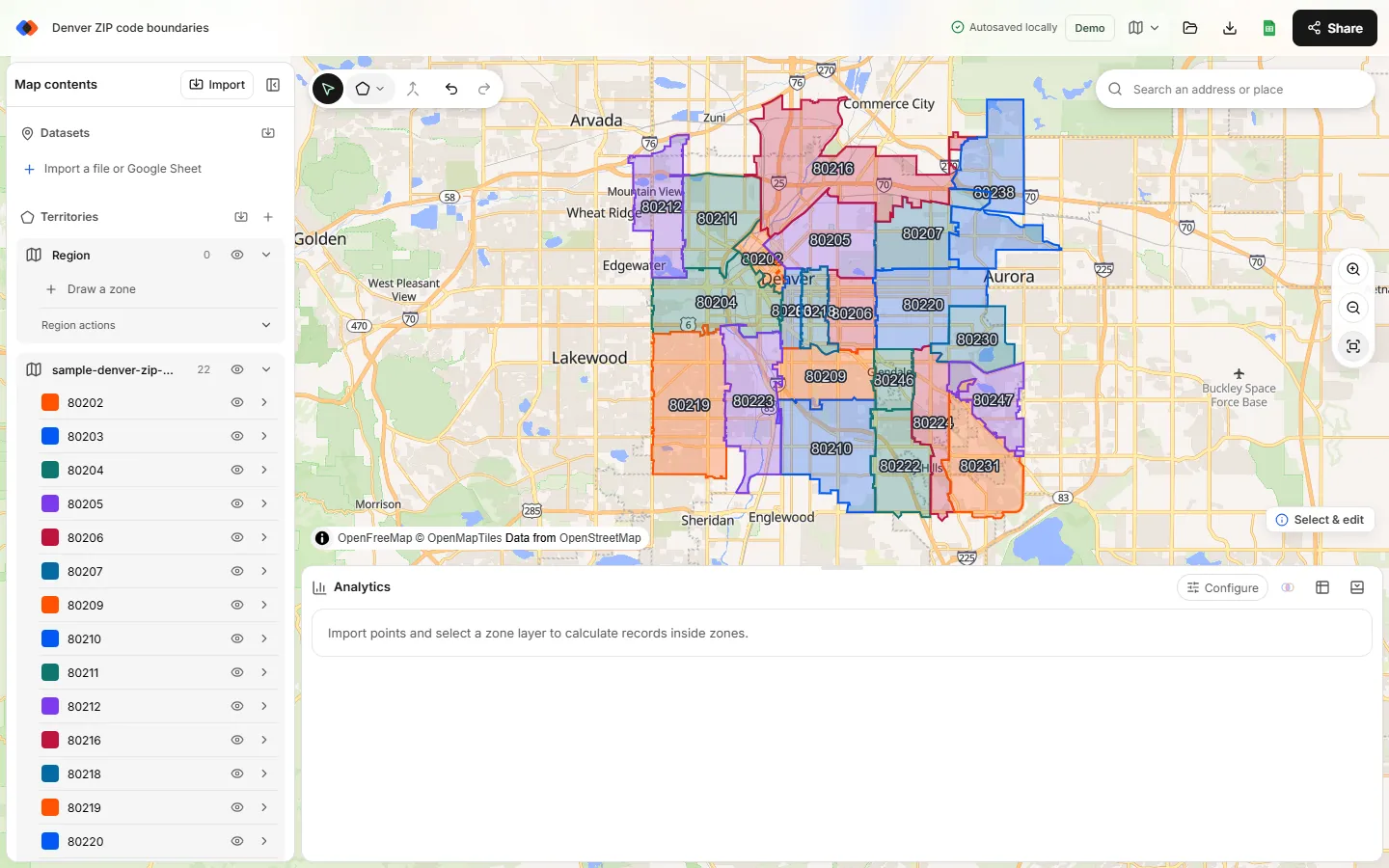
The Denver boundaries are 22 real 2020 ZCTAs from the Census Bureau at full resolution, so neighboring ZIPs share exact borders. Three small holes downtown are single-building ZIP codes, which the Census Bureau treats as separate areas. The accounts are synthetic.
Part 1: Build territories from ZIP boundaries
Get boundaries for your area only
The national ZCTA file covers about 33,000 ZIP areas: far more than one territory map needs, and enough detail to slow any browser map down. Open it in a GIS tool such as QGIS, select the ZIPs in your state or metro area, and export only the selection as KML. To practice first, use the Denver sample.
Import the KML
In the map builder, choose Import and drop in the KML. Each ZIP area becomes a zone inside a new region, named after its KML placemark name. In the sample that's the ZIP code. When you export from QGIS, set the KML NameField option to the ZIP column (ZCTA5CE20 in the 2020 file); otherwise zones import as “Zone 1”, “Zone 2” and so on. KML colors aren't imported; TerritoryKit assigns its own.
Select the ZIPs for one territory
With the select tool active, Ctrl-click (Cmd-click on a Mac) or Shift-click each ZIP that belongs to the first territory. The status pill shows how many zones are selected.
Merge them
Choose Merge selected zones in the map toolbar. The ZIP areas combine into one zone and their shared borders disappear. ZIPs that don't touch become separate pieces named “… merged 1”, “… merged 2”. Rename the result, for example “North territory”, and pick its color. If your boundary file was simplified, neighbors may not share exact edges, so check for unassigned points along the seams after merging.
Repeat, then tidy up
Merge the ZIPs for each remaining territory. Any ZIP still on its own either needs a territory or sits outside your plan and can be deleted.
Part 2: Map accounts that only have ZIP codes
TerritoryKit needs latitude and longitude for every account. When all you have is a ZIP code, the ZCTA's internal point is a reasonable stand-in.
Download the Gazetteer ZCTA file
On the Census Bureau's Gazetteer Files page, download the ZIP Code Tabulation Areas file and unzip it. Its columns are GEOID (the ZIP), GEOIDFQ, ALAND, AWATER, ALAND_SQMI, AWATER_SQMI, INTPTLAT and INTPTLONG.
Open it with the right delimiter
The file is pipe-delimited. In Excel, use Data → From Text/CSV, choose a custom delimiter of
|, and set Data Type Detection to “Do not detect data types” so ZIPs such as 02108 keep their leading zero.Look up coordinates
With the Gazetteer on a sheet named
Gazand ZIPs in column C of your account list, add=XLOOKUP(TEXT(C2,"00000"),Gaz!A:A,Gaz!G:G,"")for latitude and the same formula withGaz!H:Hfor longitude. UseLEFT(C2,5)first if some ZIPs are ZIP+4. Practicing with the Denver files? The coordinates file has just three columns, zip, latitude and longitude, so use its columns B and C instead of G and H.Find ZIPs that didn't match
Filter for blank coordinates. These are usually PO Box or unique ZIPs without a ZCTA, typos, or ZIPs created after the Census release. Fix them by hand or geocode their addresses.
Import and count
Import the list, then in the Analytics panel choose Configure and pick the accounts under Dataset and your merged ZIP territories under Territories.
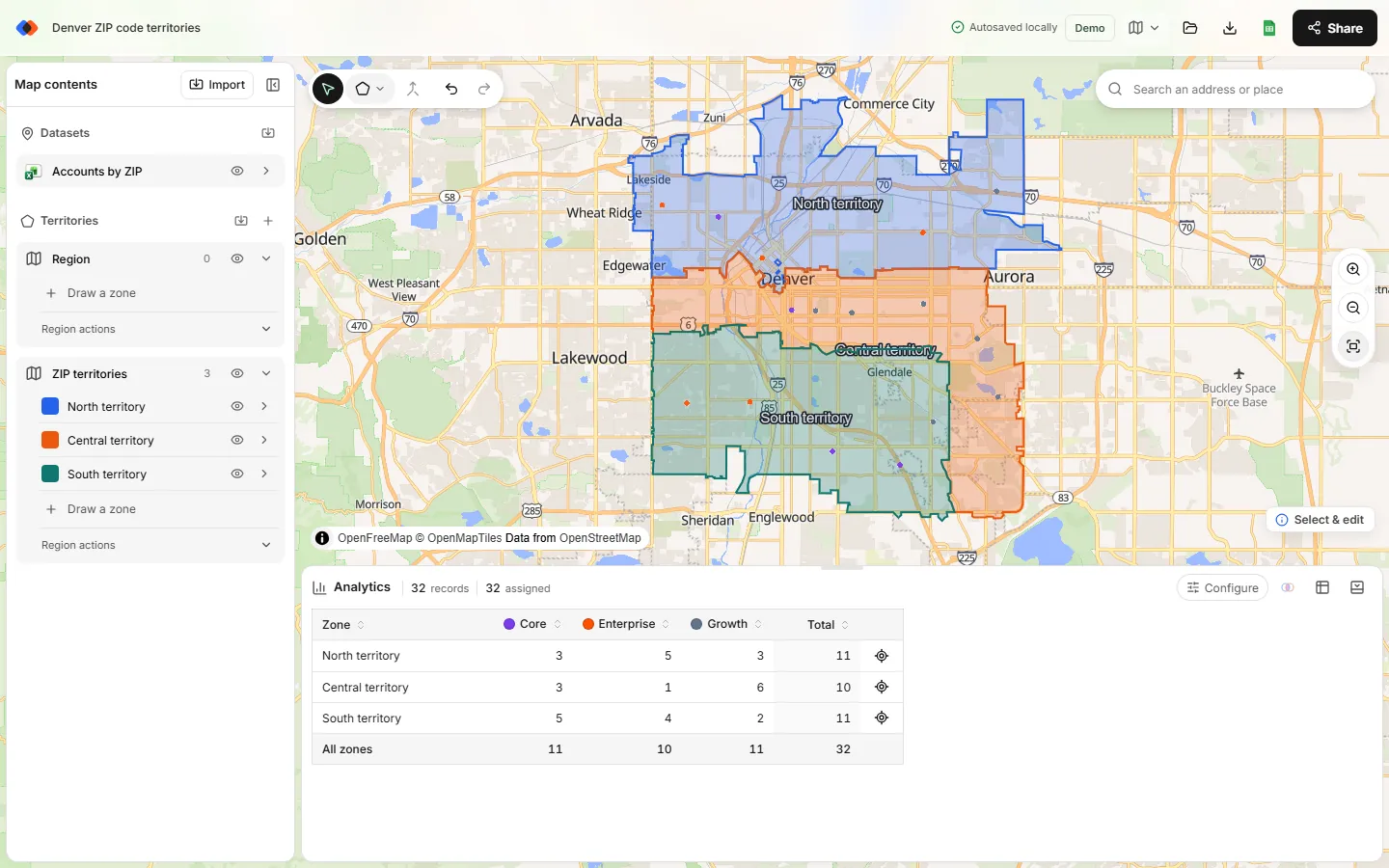
Accounts in the same ZIP share one internal point, so they stack on the map. Counts still work when each territory is made of whole ZIP areas: a ZIP's internal point sits inside that ZIP's area, so its accounts land in the territory the ZIP belongs to. Spot-check ZIPs along territory edges, because simplified boundary files can shift a border slightly.
When ZIP coordinates aren't precise enough
Just need to see a list of ZIP codes on a map, without building territories? See how to plot ZIP codes on a map.
ZIP-level coordinates are fine for territories made of whole ZIPs. They're not fine when a boundary cuts through a ZIP, when you need drive distances, or when two reps split a busy ZIP. In those cases, geocode the street addresses instead; how to convert addresses to latitude and longitude covers free options.
Limitations to know
- TerritoryKit has no built-in ZIP, county or demographic layers. You import boundaries as KML or KMZ.
- Census cartographic boundary files are simplified for mapping, so borders are approximate.
- ZCTAs are updated with each census, while USPS changes ZIP Codes more often. Check new or changed ZIPs by hand.
- Large boundary files slow down any browser map. Import only the area you plan.
FAQ
Can I make a ZIP code territory map for free?
Yes. ZIP Code Tabulation Area boundaries and Gazetteer coordinates are free from the U.S. Census Bureau, and TerritoryKit can import the boundaries, merge them into territories and count accounts in your browser.
Does TerritoryKit have ZIP code boundaries built in?
No. Import ZCTA boundaries as KML or KMZ. The guide includes a Denver sample to practice with.
What is the difference between a ZIP code and a ZCTA?
A ZIP Code is a USPS delivery designation made of addresses and routes. A ZCTA is the Census Bureau's approximate area for a ZIP Code, built from census blocks for statistics and mapping.
How do I assign accounts to territories by ZIP code?
Either look up each account's ZIP in a ZIP-to-territory list, or give accounts ZIP coordinates and let the map assign them. The account assignment guide shows how to export the result.
Why don't some of my ZIP codes match?
PO Box-only and single-building ZIP Codes often have no ZCTA, and newer ZIPs may not be in the latest Census files. Geocode those accounts' addresses instead.
Related guides
Build your first territory map
Bring your account list, draw the territories you need, and see the results as the map changes. Your first map is free.
Open Map Builder