KML vs KMZ for territory mapping
This guide explains KML vs KMZ in plain language and shows how those files fit into territory mapping workflows.
When to use this
Use this page when someone sends you a boundary file, you export territories for another mapping tool, or you want to compare existing shapes with your own location points.
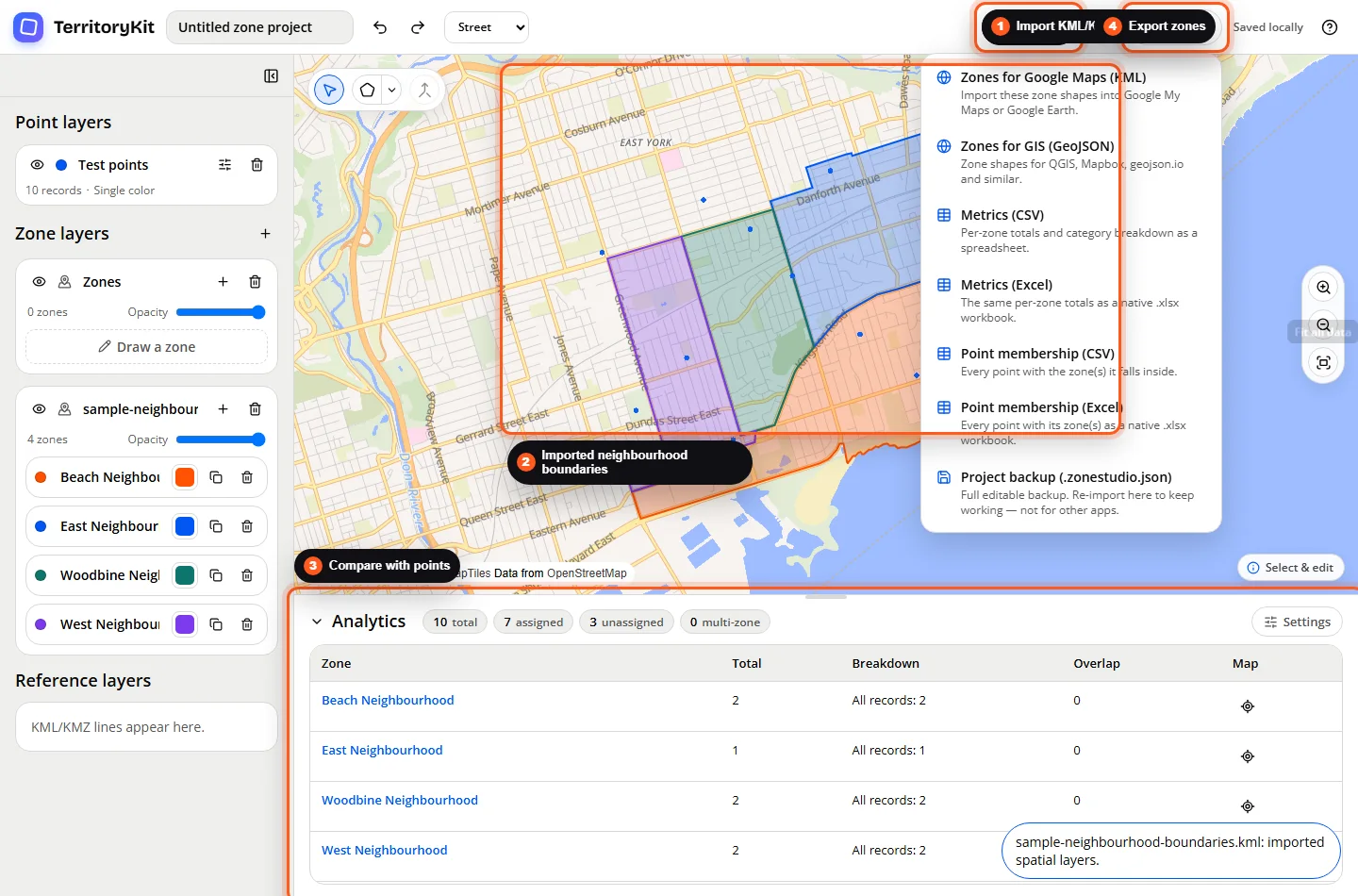
Step-by-step workflow
Understand KML
KML is a plain XML-based map file. It can contain points, lines, and polygon boundaries, along with names and other properties.
Understand KMZ
KMZ is a zipped package that usually contains a KML document. It is useful when a mapping tool exports a compressed boundary file.
Import the boundary file
Open Import, upload a KML or KMZ file, and let TerritoryKit create point, zone, or reference layers depending on the geometry in the file.
Compare boundaries with locations
Import or create a point layer, then use analytics to compare those points with the imported zone layer.
Check import issues
If a file does not import, confirm the KML is valid XML, the KMZ contains a KML document, and the file uses supported point, line, polygon, multipoint, multiline, multipolygon, or geometry collection data.
Export territory geometry
When you need to share territory shapes, export zone geometry as KML for Google mapping workflows or GeoJSON for GIS tools.
Supported formats and inputs
- KML files can import point, polygon, multipoint, multipolygon, line, multiline, and geometry collection data where the geometry is valid.
- KMZ imports are supported when the archive contains a KML document.
- KML NetworkLink elements are ignored by the current importer.
- TerritoryKit exports zone geometry as KML and GeoJSON.
Tips and common mistakes
- If a KMZ does not import, check that it contains a KML file such as doc.kml.
- If only lines appear, the file may contain reference geography rather than closed territory polygons.
- If a polygon is invalid, simplify or repair it in the source mapping tool before importing.
- Keep boundary names short and readable so layer and zone panels stay easy to scan.
Export and results
Imported KML/KMZ zones can be analyzed with point layers and exported later as KML, GeoJSON, metrics CSV/Excel, point membership CSV/Excel, or a project backup.
FAQ
Is KMZ better than KML?
Not always. KML is easier to inspect as text. KMZ is useful when a tool gives you a compressed package.
Can TerritoryKit import KML boundaries?
Yes. Polygon and multipolygon geometry can become zone layers when the geometry is valid.
Can KML files contain points too?
Yes. TerritoryKit can create a point layer when the KML contains point geometry.
Can I convert KML to shapefile?
No. TerritoryKit does not export shapefiles. It exports zone geometry as KML or GeoJSON.
Can I compare KML zones with CSV points?
Yes. Import the CSV points, import the KML or KMZ zones, then review analytics.
Related workflows
Build your first territory map
Bring your coordinates, draw the zones you need, and see the results as the map changes.
Open Map Builder