How to balance sales territories by potential and workload
Two territories with the same number of accounts can be wildly different jobs. Balancing means giving every rep a comparable opportunity and a workload they can actually cover. Here's how to choose the right measure and rebalance territories with your own data.
What a balanced territory means
A balanced sales territory plan gives each territory a similar opportunity to hit its target and a workload one person can cover. It does not mean identical territories. A dense downtown territory can hold more accounts than a rural one because travel takes less time, and a territory full of large accounts may need fewer of them.
Unbalanced territories cost real money: overloaded reps leave accounts uncovered, underloaded reps run out of pipeline, and quota attainment ends up reflecting the map rather than the rep.
Choose your balancing measure
| Measure | What it captures | Watch out for |
|---|---|---|
| Account count | How many relationships each rep owns | Treats a corner shop and a national chain the same |
| Revenue potential | The opportunity available in each territory | Needs an estimate per account, such as company size or category spend |
| Current revenue | Today's book of business | Rewards whoever already owns the best accounts |
| Workload | Time needed to serve accounts, such as visits per year × hours per visit | Needs a visit or touch frequency per account or segment |
| Travel | Area covered and distance between accounts | Large rural territories can be balanced on paper and impossible in practice |
Most teams pick one primary measure, usually potential or workload, and use account count and travel as checks. Whatever you choose, it has to be a column in your account list so the map can add it up.
Step-by-step: balance territories on a map
- Prepare the data. One row per account with latitude, longitude and numeric columns for your measures, such as
annual_potentialandvisits_per_year. The sales territory plan template has these columns ready. - Map accounts and current territories. Import the accounts into the TerritoryKit map builder, then draw your current territories or import them as KML or KMZ.
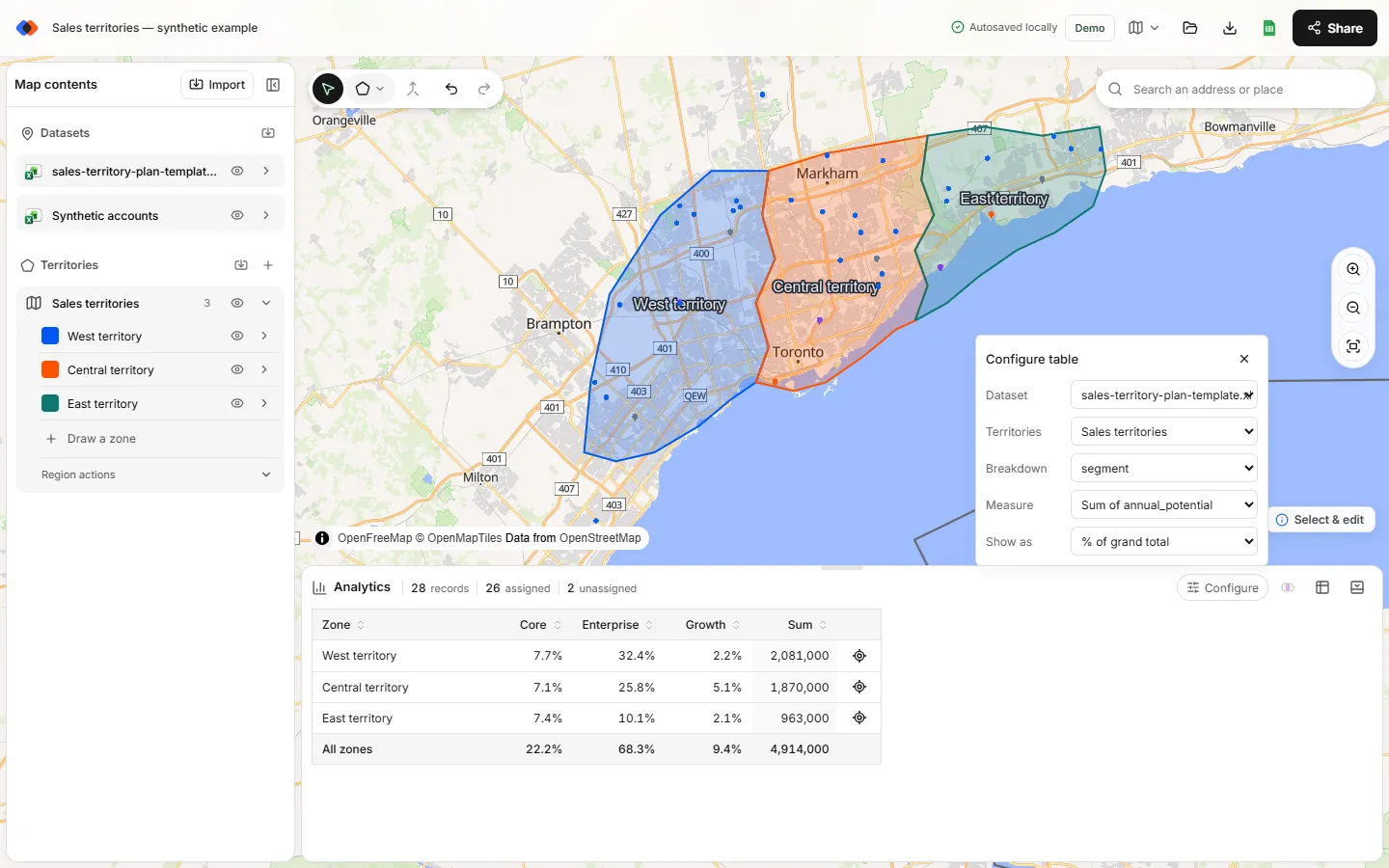
- Measure each territory. In Analytics, choose Configure, pick your accounts under Dataset and your territories under Territories, then set Measure to Sum of annual_potential and compare each territory's Sum with the average. With a Breakdown such as segment, Show as → % of grand total shows each territory-and-segment cell as a share of all assigned potential.
- Find the extremes. Sort by the total column. The heaviest and lightest territories tell you where boundaries need to move.
- Move one boundary at a time. Reshape the border between a heavy territory and a light neighbor. Totals update after each edit, so you see the effect of every change; the data table's Assigned zones column shows where each account now sits.
- Check the side effects. Turn on the overlap highlight to catch accounts that ended up in two territories, and watch the unassigned count in the Analytics header.
- Test a second measure. Switch Measure to Sum of visits_per_year or Count of records. A plan balanced on potential can still be unbalanced on workload.
- Export and document. Export point membership for the new assignments. It keeps your numeric columns, so a pivot table in Excel rebuilds the per-territory sums; the separate metrics export lists counts per territory. Then log what moved and why.
Worked example
The free plan template has 28 synthetic accounts: 10 in West, 10 in Central, 6 in East and 2 unassigned. The counts are already uneven, and potential is even more lopsided:
| Territory | Before | vs average | After | vs average | Accounts after | Visit hours after |
|---|---|---|---|---|---|---|
| West | 2,081,000 | +27% | 1,715,000 | −1% | 9 | 114 |
| Central | 1,870,000 | +14% | 1,816,000 | +5% | 9 | 129 |
| East | 963,000 | −41% | 1,678,000 | −3% | 10 | 111 |
| Unassigned | 295,000 | — | 0 | — | 0 | — |
Three boundary changes fixed it:
- The Central–East border moved west, so East picked up the four Central accounts nearest the old border.
- The West–Central border moved west in the north, so Central picked up two accounts to make up for the four it lost.
- West and Central each extended to cover one previously unassigned account.
Notice that account counts went from 10/10/6 to 9/9/10. Balancing on potential doesn't require equal counts, and equal counts didn't mean balanced potential.
Rules that keep territories balanced
- Keep territories contiguous unless there's a reason not to. Islands of accounts add travel and confuse ownership.
- Respect natural barriers such as rivers, highways and bridges that change real travel time.
- Hold named accounts separately. Large strategic accounts shouldn't move every time a boundary does.
- Limit churn. Moving many relationships at once hurts customers and pipeline. Prefer a few deliberate changes.
- Re-check quarterly and whenever reps join or leave.
What TerritoryKit does and doesn't do
TerritoryKit calculates counts and sums per territory as you edit, highlights overlaps and reports unassigned accounts. It doesn't move boundaries for you: there is no automatic territory optimization or route-based travel time. You stay in control of each change and see its effect on the totals straight away.
FAQ
What is the best way to balance sales territories?
Pick a primary measure, usually revenue potential or workload, set a tolerance band such as ±15% of the average, and adjust boundaries until each territory falls inside it. Check account count and travel as secondary measures.
Should sales territories have the same number of accounts?
Not necessarily. Accounts differ in size and effort. Balance potential and workload; account counts can differ.
Can TerritoryKit sum revenue by territory?
Yes. Set Measure to Sum of a numeric column, such as revenue, to total it per territory, with an optional breakdown by a category column and percentage views. Store the values as plain numbers so the column is recognized.
Does TerritoryKit balance territories automatically?
No. You move the boundaries; TerritoryKit recalculates the totals and shows overlaps and unassigned accounts after every change.
How do I estimate workload for each territory?
Add a visit or touch frequency per account, multiply by the time each visit takes, and sum it per territory. The plan template does this on its Summary sheet.
Related guides
Build your first territory map
Bring your account list, draw the territories you need, and see the results as the map changes. Your first map is free.
Open Map Builder