Franchise territory mapping: protected areas, overlaps and new sites
Every franchise territory is a promise to an owner. A territory map makes those promises visible, so overlaps and gaps are caught before the next agreement is signed and every new site is checked against existing protected areas.
Quick answer
Map your franchise units and prospective sites as points, then add each franchisee's territory as a polygon, either imported from KML or drawn on the map. Check each unit and prospect against the territories: a point inside two territories means overlapping protected areas, and a prospect inside an existing territory may conflict with that owner's rights. Export the map and the territory boundaries for your development team and legal review.
How franchise territories are usually defined
| Definition | Example | How to map it |
|---|---|---|
| Radius around the unit | Within 3 miles of the restaurant | Create an exact buffer in a GIS tool such as QGIS and import it as KML |
| Named geographies | ZIP codes 80202, 80203 and 80205 | Import ZIP boundaries and merge them; see ZIP code territory maps |
| Custom boundary | North of the river, west of the highway | Draw a polygon along the described streets and features |
| Population or households | An area containing 50,000 households | Needs demographic data from another source; TerritoryKit doesn't include demographics |
Whatever the definition, keep the written description and the map consistent. The written text in the agreement controls; the map is how everyone sees it.
What to put on the map
- Units: every open and signed location with an ID, franchisee, status and opening date.
- Territories: one polygon per protected area, named with the franchisee and unit number.
- Prospective sites: locations under review from your real-estate or development pipeline.
- Optional demand data: customer or lead locations, to see how much of the market each territory holds.
Step-by-step: map and check franchise territories
Import units and prospects
In the map builder, import a CSV or Excel file of units with latitude, longitude and a
statuscolumn such as Open, Signed or Prospect. Color the points by status so prospects stand out.Add the territories
Import existing boundaries as KML or KMZ, or draw them with the polygon tool. For radius-based territories, create exact-distance buffers in a GIS tool and import them, because TerritoryKit's circle tool is sized by dragging and doesn't show a radius.
Name every territory clearly
Use a consistent pattern such as “#014 Northside – J. Owner” so territories are identifiable in the legend, exports and reviews.
Check units against territories
In the Analytics panel, choose Configure, pick the units under Dataset and the territories under Territories. Each open unit should fall inside its own territory and no other. The multi-zone total and the overlap highlight show any unit inside two territories.
Test prospective sites
Open the data table and filter the status column for Prospect. The Assigned zones column shows whether each site sits inside an existing protected area, and Unassigned shows sites in open markets.
Export for review
Use Export → Map image or print/PDF for a labeled map, Zones for Google Maps (KML) or Zones for GIS (GeoJSON) for the boundaries, and Point membership for a table of sites and the territories they fall in. Exports need a free account.
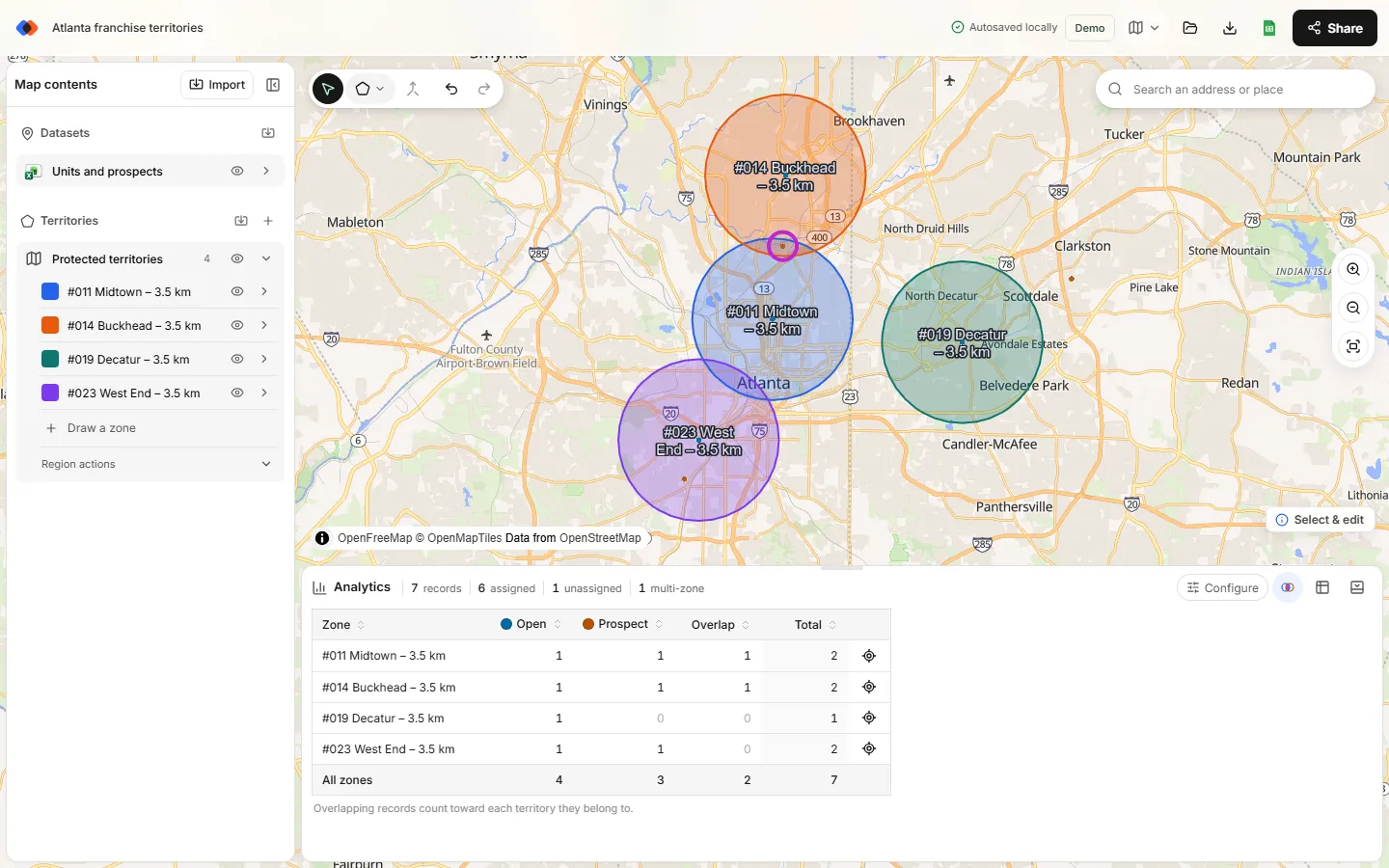
Evaluating a new territory
- Draw the proposed territory in a separate region, such as “Proposed 2027”, so it doesn't change current numbers.
- Switch Territories in Analytics to the proposed region to list the units and prospects inside it. Analytics checks one region at a time, so compare its borders with existing territories visually as well.
- Add demand data, such as customers or leads, to compare the proposed territory with established ones.
- Export the map and boundary file for the development committee and legal review.
Keep a territory register
Alongside the map, keep a spreadsheet of territory ID, franchisee, unit, definition type, written description, effective date and expiry. Record every change with a date and reason. When questions come up years later, the register and an exported project backup show exactly what was agreed and when.
Note: this guide covers mapping, not legal advice. How territories are described and disclosed in franchise agreements and disclosure documents is a question for your franchise counsel.
FAQ
What is a protected franchise territory?
An area defined in a franchise agreement in which the franchisor agrees not to place another unit, or to limit competition from its own system, under the agreement's terms.
How do I map a franchise territory with an exact radius?
Create a buffer of the exact distance in a GIS tool such as QGIS, export it as KML and import it into TerritoryKit. The built-in circle tool is for approximate areas.
Can TerritoryKit find overlapping franchise territories?
It flags units, prospects or customers that fall inside two or more territories. It doesn't measure the overlapping area itself, so review borders visually as well.
Can I check a prospective site against existing territories?
Yes. Import the site as a point; the data table's Assigned zones column shows which existing territories contain it.
Does TerritoryKit include population or household data?
No. If your territories are defined by population, import demographic data as points with a numeric population or household column, such as Census block-group population centers, then total it per territory with Measure → Sum of that column.
Related guides
Build your first territory map
Bring your account list, draw the territories you need, and see the results as the map changes. Your first map is free.
Open Map Builder