Free territory mapping software: 5 options compared
Plenty of tools let you draw on a map for free. Fewer can tell you how many customers sit inside each territory. This comparison covers five free or low-cost options, what each does well, and the limits you will hit.
Quick comparison
| Tool | Best for | Free version | Counts per territory | Runs on |
|---|---|---|---|---|
| TerritoryKit | Territory maps from spreadsheets, with counts and overlaps | Guest mapping; free Demo account with 1 owned map and 10 exports | Yes | Desktop browser (Windows, Mac, Linux) |
| Google My Maps | Quick shared maps from addresses | Free with a Google account | No | Browser; view on phones in Google Maps |
| QGIS | Full GIS analysis and custom cartography | Free and open source | Yes, with processing tools | Windows, macOS, Linux desktop |
| Excel map charts | Shading states, counties or postal codes by value | Included with Microsoft 365 | No custom territories | Excel with Microsoft 365 |
| geojson.io | Drawing simple boundaries as files | Free | No | Browser |
What to look for in a free territory map maker
- Import. Can it read your spreadsheet as-is, and how many rows? Does it need latitude and longitude, or can it place street addresses?
- Drawing and editing. Polygons, circles and the ability to reshape, merge and split territories without starting over.
- Assignment. Does it count the records in each territory and tell you which territory each record belongs to?
- Exceptions. Does it show records in two territories, or in none?
- Exports. An image for slides, a table for Excel or a CRM, and boundary files such as KML for other tools.
- Limits and privacy. Row caps, export caps, and where your customer data is stored.
- Platform. Mac users should check before installing anything.
1. TerritoryKit
Best for: building territory maps from Excel, CSV or Google Sheets data and checking how records are distributed.
TerritoryKit is a browser-based territory map maker. You import CSV, XLSX, XLS, KML or KMZ files or a Google Sheet, draw polygon or circle territories, and the Analytics panel counts the records inside each territory, sums numeric columns such as revenue, and breaks totals down by any category column. It flags records that fall in more than one territory or in none, and exports point membership to CSV or Excel so assignments go back into your spreadsheet.
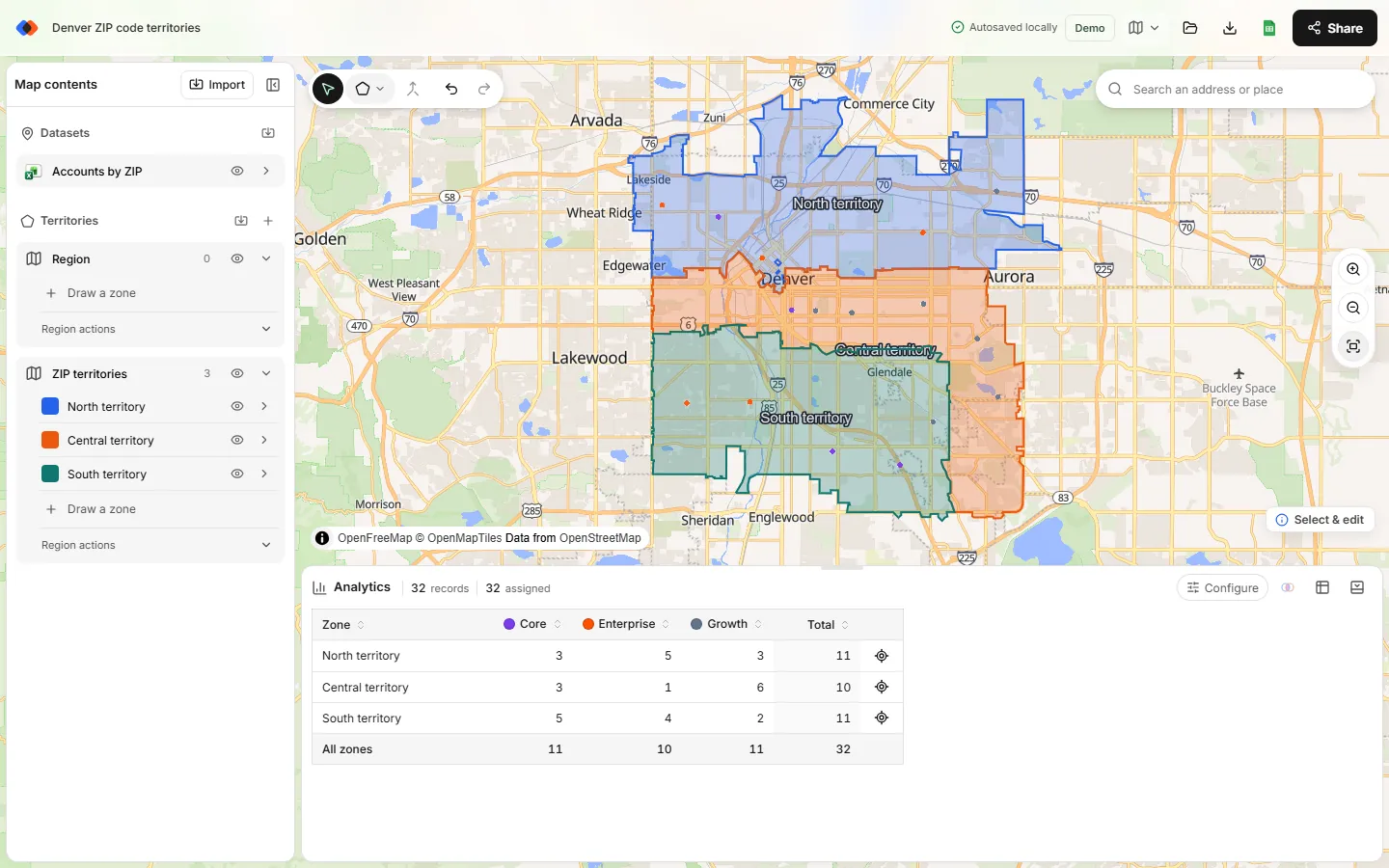
- Free version: you can map in the browser without an account. A free Demo account adds private cloud saving with one owned map, ten exports in total and 200 MB of storage. Pro removes the map and export caps.
- Limits: spreadsheet points need latitude and longitude, because TerritoryKit does not bulk-geocode addresses. It does not optimize territories automatically, plan routes or include built-in ZIP code boundaries.
- Mac: yes, it runs in current desktop browsers.
2. Google My Maps
Best for: a quick, shareable map of a few territories when your list has street addresses.
My Maps is free with a Google account. It can place rows by address, so it is the easiest start when you don't have coordinates. You draw territories with the line-and-shape tool and share the map like a Google Doc; teammates can open it in Google Maps on a phone.
- Limits: 2,000 rows per imported file and per layer, 10,000 features per map, and a 20,000-cell cap on the map's data tables.
- Missing for territory planning: no count of the places inside each shape, no overlap or gap report, and no territory column written back to your data.
- Mac: yes, in a browser.
Step-by-step instructions are in how to create a territory map in Google Maps.
3. QGIS
Best for: analysts who need full GIS power, custom projections or advanced cartography.
QGIS is free, open-source desktop GIS software for Windows, macOS and Linux. It can do almost anything with geographic data. Its Count points in polygon tool produces territory counts, and you can join census data, style maps in detail and export many formats.
- Limits: a real learning curve. Territory editing, joins and exports are separate steps that assume GIS knowledge, and sharing a QGIS project with non-GIS colleagues usually means exporting images or files.
- Mac: yes, native installer.
4. Excel map charts
Best for: coloring states, counties or postal codes by a value or category, when the territories follow those boundaries exactly.
If you have Microsoft 365, Excel's map chart can shade regions. Add a territory name next to each state or county and Excel colors the regions by territory. It's a fast way to show a territory plan that is defined entirely by administrative areas.
- Limits: Microsoft notes that map charts plot only high-level geography, so latitude and longitude points and street addresses aren't supported, and they support one-dimensional display only. You can't draw custom boundaries or count points per territory. Creating maps requires an internet connection.
- Mac: map charts work in Excel for Microsoft 365 on Mac. The separate 3D Maps feature is Windows-only.
More detail, including a TerritoryKit workflow that keeps Excel as the source, is in sales territory mapping in Excel.
5. geojson.io
Best for: drawing a few simple boundaries and saving them as a file for another tool.
geojson.io is a free browser editor for geographic shapes. You draw polygons on a map and save them as GeoJSON. It's a handy scratchpad for a boundary file, but it has no territory concepts: no record counts, assignments or reports. TerritoryKit imports boundaries as KML or KMZ rather than GeoJSON, so save your shapes from geojson.io as KML instead.
Territory mapping software for Mac
Older desktop tools such as Microsoft MapPoint were Windows-only, which is why "territory mapping software for Mac" is still a common search. Today the simplest answer is a browser tool: TerritoryKit, Google My Maps and geojson.io all run in Safari, Chrome or Firefox on a Mac. QGIS installs natively on macOS. For Excel users, map charts work on Mac with Microsoft 365, but 3D Maps does not. The territory mapping software for Mac guide compares the Mac options in detail, and the MapPoint alternatives guide covers the migration.
When a free tool stops being enough
Free tools cover drawing, counting and sharing territories. Consider specialized paid software when you need:
- Automatic territory optimization that balances workload for dozens of reps.
- Route planning, drive-time areas or daily scheduling.
- Two-way CRM synchronization with permissions per territory.
- Built-in demographic or postal boundary data you don't want to source yourself.
Many teams still start free: build the plan, check the numbers, and only pay for automation once the manual process shows where time is going.
FAQ
Is there a completely free territory map maker?
Google My Maps and QGIS are free with no paid tier. TerritoryKit lets you map in the browser without an account, and its free Demo account includes one owned map and ten exports.
What is the best free territory mapping software for sales teams?
If you need to know how many accounts each rep has, choose a tool that counts records per territory, such as TerritoryKit or QGIS. If you only need a visual map from addresses, Google My Maps is quicker.
Can I make a territory map in Excel for free?
If you already have Microsoft 365, map charts can color states, counties or postal codes by territory. They can't plot coordinate points or draw custom territory shapes.
Is there free territory mapping software for Mac?
Yes. Browser tools such as TerritoryKit, Google My Maps and geojson.io work on a Mac, and QGIS has a native macOS version.
Do free territory mapping tools geocode addresses?
Google My Maps places rows by address. TerritoryKit needs latitude and longitude for spreadsheet points; the geocoding guide shows free ways to add them.
Related guides
Build your first territory map
Bring your account list, draw the territories you need, and see the results as the map changes. Your first map is free.
Open Map Builder