Territory mapping software for Mac: 6 options that work on macOS
For years, territory mapping meant Windows: Microsoft MapPoint, Excel 3D Maps and many sales mapping tools never ran on a Mac. That has changed. This guide compares the territory mapping options that work on macOS today, what each can and can't do, and how to build a territory map on a Mac from a Numbers or Excel spreadsheet.
Quick answer
The easiest territory mapping software for a Mac is a browser-based territory map maker, because it needs no installation and behaves the same as on Windows. Use:
- TerritoryKit to draw territories over spreadsheet data and count the accounts in each.
- Google My Maps for a quick shareable map from addresses.
- Excel for Mac map charts to shade states, counties or ZIP codes by territory.
- QGIS when you need full GIS analysis on a native Mac app.
Avoid Windows-only tools such as MapPoint and Excel 3D Maps unless you're prepared to run a Windows virtual machine.
Why territory mapping used to be hard on a Mac
The tools sales and operations teams relied on were built for Windows:
- Microsoft MapPoint was Windows-only, and it was discontinued at the end of 2014.
- Excel 3D Maps, the feature that plots latitude and longitude in Excel, is only in Excel for Windows.
- Power BI Desktop, often used for map reports, is a Windows application.
- Many older desktop territory tools shipped Windows installers only.
Browser-based tools removed the problem. If a mapping tool runs in Safari or Chrome, it runs on a Mac.
Territory mapping options for Mac compared
| Option | How it runs on Mac | Custom territories | Counts per territory | Cost |
|---|---|---|---|---|
| TerritoryKit | Browser: Safari, Chrome, Firefox or Edge | Yes: draw, import, merge and split | Yes, with sums and overlaps | Free Demo plan; Pro for unlimited maps |
| Google My Maps | Browser | Draw by hand | No | Free |
| Excel for Mac map charts | Native app with Microsoft 365 | Only states, counties or postal codes | No | Microsoft 365 subscription |
| Google Earth Pro | Native Mac app | Draw polygons, import KML | No | Free |
| QGIS | Native Mac app | Yes, full GIS editing | Yes, with processing tools | Free, open source |
| Windows tools in a virtual machine | Windows inside virtualization software | Depends on the tool | Depends on the tool | Windows license plus virtualization software |
1. TerritoryKit (browser)
TerritoryKit is a territory map maker that runs in any current desktop browser, including Safari on macOS. Import a CSV, Excel workbook or Google Sheet, draw polygon or circle territories, and the Analytics panel counts the accounts in each territory, sums columns such as revenue, and flags accounts in two territories or in none. Export the map as PNG or PDF, territories as KML or GeoJSON, and assignments back to Excel or Numbers as CSV.
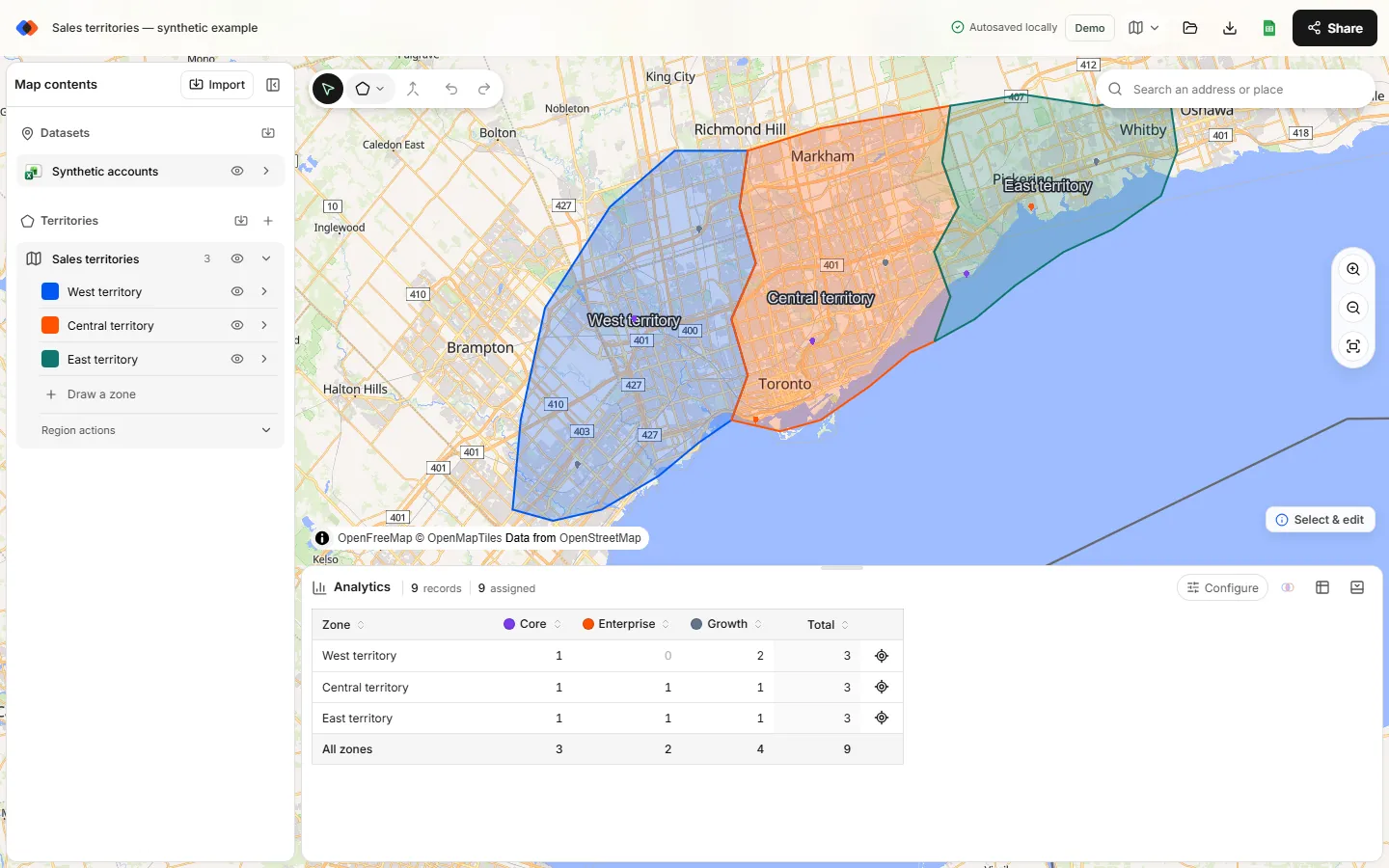
- Good on a Mac because: nothing to install, Cmd-click works for selecting several territories, and files move to and from Numbers or Excel as CSV.
- Limits: spreadsheet rows need latitude and longitude; there's no built-in ZIP layer, routing or automatic territory optimization.
2. Google My Maps (browser)
My Maps is free with a Google account and places spreadsheet rows by address, so it's a quick start when you don't have coordinates. Draw territories with the shape tool and share the map like a Google Doc. It doesn't count what's inside a territory, and imports are capped at 2,000 rows per layer. Step-by-step instructions are in how to create a territory map in Google Maps.
3. Excel for Mac map charts
With Microsoft 365, Excel for Mac can create filled map charts that shade countries, states, counties or postal codes. Put a territory name next to each area and Excel colors the map by territory. It's ideal when territories are defined entirely by those areas and you only need a picture. It can't plot coordinates, draw custom shapes or count accounts per territory, and 3D Maps isn't available on Mac. See sales territory mapping in Excel.
4. Google Earth Pro (native app)
Google Earth Pro is a free desktop app for macOS. You can draw territory polygons, import KML boundaries and view them over satellite imagery. It's handy for checking a boundary against the real ground, but it has no territory analysis: no counts, sums or assignment tables. Territories saved from Google Earth as KML import straight into TerritoryKit when you need the numbers.
5. QGIS (native app)
QGIS is free, open-source GIS software with a native macOS installer. It can do nearly everything: join census data, count points in polygons, create exact-distance buffers, and produce publication-quality maps. The trade-off is a learning curve and a workflow built for GIS specialists rather than sales teams. It's also the best free tool for preparing boundary files, such as cutting a national ZIP code file down to your state.
6. Windows software in a virtual machine
If your team depends on a Windows-only mapping program, virtualization software can run Windows on a Mac. Check the costs and compatibility first: you'll need a Windows license, the virtualization app, and confirmation that the program works on your Mac's processor. For MapPoint specifically, a virtual machine keeps old projects readable, but the map data inside MapPoint is more than a decade old. Rebuilding the territories is usually the better long-term fix; see how to rebuild MapPoint territories.
How to make a territory map on a Mac
Get your list into CSV or Excel
In Numbers, choose File → Export To → CSV. In Excel for Mac, save as .xlsx or CSV. Make sure the list has latitude and longitude columns; if it only has addresses, see how to convert addresses to coordinates.
Open the map builder in Safari or Chrome
Go to the TerritoryKit map builder. You can start as a guest; sign in to save the map and export.
Import and map the coordinate columns
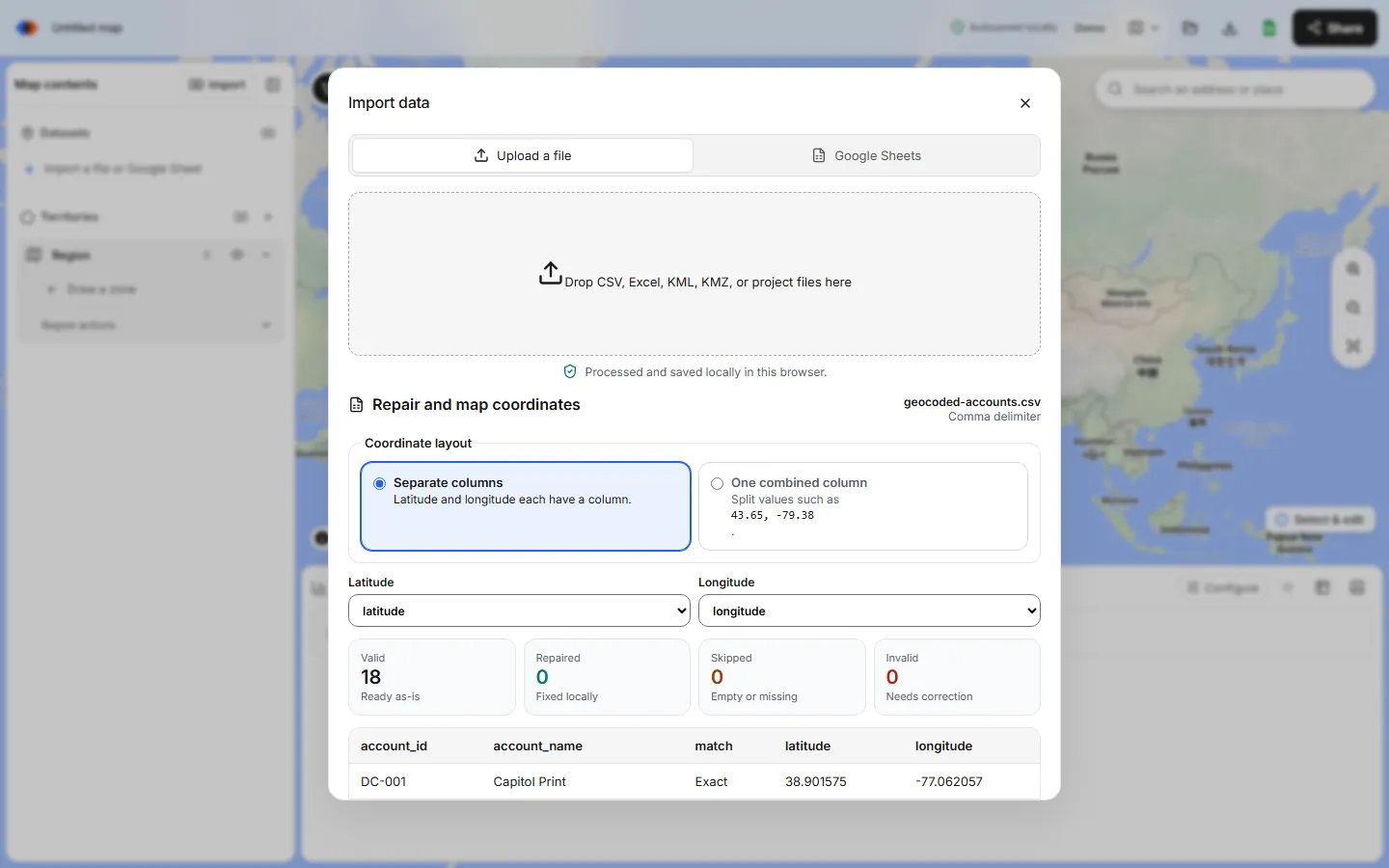
Choose Import, drop in the file and select latitude and longitude. Review the valid and invalid row counts before adding the layer.
Draw the territories
Choose Polygon and click each corner; double-click or press Return to finish. To edit several territories, Cmd-click or Shift-click them with the select tool.
Check counts and export
Open Analytics to see accounts per territory, then export a PDF for slides or point membership as CSV to open in Numbers or Excel.
Choosing the right Mac territory tool
- You need counts, sums and assignments per territory: TerritoryKit or QGIS.
- You only need a picture of territories by state or county: Excel for Mac map charts.
- You have addresses and need a quick shared map: Google My Maps.
- You're replacing MapPoint: start with the MapPoint alternatives guide.
- You want everything free: compare all the options in free territory mapping software.
FAQ
Is there territory mapping software for Mac?
Yes. Browser-based tools such as TerritoryKit and Google My Maps work in Safari or Chrome on a Mac, and QGIS and Google Earth Pro have native macOS apps. Excel for Mac can shade states, counties and ZIP codes with map charts.
Does Excel for Mac have 3D Maps?
No. 3D Maps, which plots latitude and longitude points, is only in Excel for Windows. Excel for Mac with Microsoft 365 supports filled map charts by region.
Is there a MapPoint for Mac?
MapPoint never ran on macOS and was discontinued at the end of 2014. Browser-based territory mapping tools are the simplest Mac replacement; see MapPoint alternatives.
Can I make a territory map on a Mac for free?
Yes. Google My Maps, Google Earth Pro and QGIS are free, and TerritoryKit lets you map in the browser without an account, with a free Demo plan for saving and exports.
Can I use Numbers for territory mapping?
Numbers doesn't have map charts, but it's a fine place to keep the account list. Export it to CSV and import it into a territory mapping tool.
Related guides
Build your first territory map
Bring your account list, draw the territories you need, and see the results as the map changes. Your first map is free.
Open Map Builder