Microsoft MapPoint alternatives for territory mapping
Microsoft stopped selling MapPoint at the end of 2014, yet many sales and operations teams still miss its territory maps. This guide maps each MapPoint job to a current replacement, including browser options that run on a Mac.
What happened to Microsoft MapPoint?
MapPoint was Microsoft's Windows desktop mapping program. Its final release, MapPoint 2013, shipped in 2012. Microsoft announced in 2014 that it would stop selling MapPoint on December 31, 2014, along with its siblings AutoRoute and Streets & Trips, and pointed customers toward Bing Maps. Existing installations may still open, but the software and its map data no longer receive updates.
The developer side has moved on too: Microsoft has deprecated Bing Maps for Enterprise. Free Basic accounts ended on June 30, 2025, Enterprise accounts can continue until June 30, 2028, and Microsoft recommends Azure Maps for new development.
Which MapPoint job are you replacing?
| MapPoint job | Where to do it now | Notes |
|---|---|---|
| Territory maps from account lists | TerritoryKit, or a desktop GIS such as QGIS | TerritoryKit draws editable territories over coordinate data and counts records per territory in a browser. See territories from Excel. |
| Territories built from ZIP codes | ZIP Code Tabulation Area boundaries from the U.S. Census Bureau, imported as KML | There is no built-in ZIP layer in TerritoryKit. The ZIP code territory guide shows a free workflow. |
| Plotting addresses from Excel | Google My Maps for short lists, or a batch geocoder followed by a map tool | My Maps places up to 2,000 rows per import. For larger lists, add coordinates first; see addresses to latitude and longitude. |
| Shaded maps by state, county or ZIP | Excel map charts (Microsoft 365) | Map charts color regions by a value or category but cannot plot coordinates or custom boundaries. |
| Radius circles around sites | QGIS buffers for exact distances; TerritoryKit circles for approximate areas | TerritoryKit's circle tool is sized by dragging and doesn't display a radius. For an exact 10-mile ring, create a buffer in a GIS tool and import it as KML. |
| Drive-time zones | A routing or isochrone service | TerritoryKit does not calculate travel-time areas. |
| Multi-stop route planning | A dedicated route planner | TerritoryKit defines and analyzes zones; it does not sequence stops. |
| Automation from VBA or .NET | Azure Maps APIs | Microsoft's recommended path for developers leaving Bing Maps. |
Replacing MapPoint territory maps
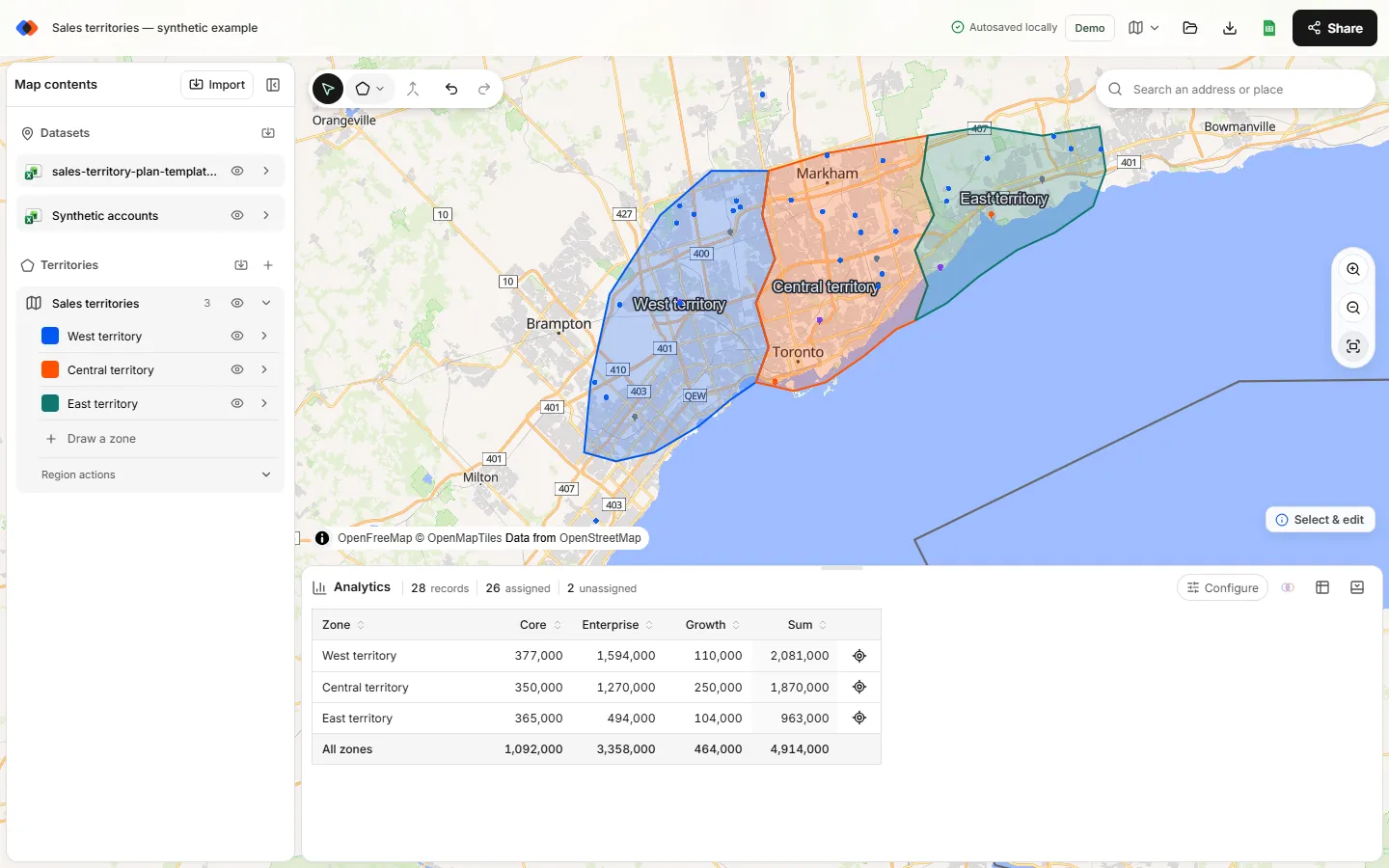
Most people searching for a MapPoint alternative want the territory map back: customers on a map, territories drawn around them, and a count of who sits where. A modern workflow looks like this:
- Get your data out of MapPoint in open formats. Export account rows to CSV or Excel with latitude and longitude, and export territory boundaries as KML if you still have a copy of MapPoint or a tool that can read the project. TerritoryKit cannot open
.ptmfiles directly; how to rebuild MapPoint territories walks through recovering ZIP code and county territories step by step. - Import the locations. Upload the CSV or workbook and select the coordinate columns. The import assistant reports skipped, repaired and invalid rows before anything is added to the map.
- Recreate or import territories. Import KML polygons, or draw polygon and circle territories directly on the map. Territories can be reshaped, merged and split as plans change.
- Check the result. Analytics counts records per territory, can sum any numeric column such as revenue, breaks totals down by a category column, and flags records that fall in two territories or in none.
- Share and export. Export a PNG or PDF for presentations, CSV or Excel for the account list with territory membership, and KML or GeoJSON for other mapping tools. Exports need a free account.
MapPoint alternatives for Mac users
MapPoint only ever ran on Windows, so Mac users were always stuck with workarounds such as virtual machines. Browser-based tools remove that problem. TerritoryKit runs in current desktop browsers on macOS and Windows, and QGIS has a native macOS version for full GIS work. Excel for Mac supports map charts with a Microsoft 365 subscription, but Excel's 3D Maps feature is Windows-only.
What TerritoryKit does not replace
Being clear about gaps saves a painful migration:
- It does not geocode street addresses in bulk. Spreadsheet points need latitude and longitude.
- It does not include demographic data, ZIP code layers or other built-in boundary sets. You bring the boundaries or draw them.
- It does not plan routes, calculate drive times or balance territories automatically.
- It does not sync with a CRM. Exports and Google Sheets are the bridge to other systems.
If those are the parts of MapPoint you relied on most, pair TerritoryKit with a routing tool or a geocoder, or choose a desktop GIS.
A low-risk way to switch
Do a pilot before moving every territory. Export one region's accounts and boundaries, rebuild them, and compare the new per-territory counts with the numbers your team already trusts. Differences usually come from missing coordinates, duplicate rows or accounts sitting exactly on a shared border. Once one region matches, migrate the rest and keep a portable project backup.
FAQ
Is Microsoft MapPoint still available?
No. Microsoft stopped selling MapPoint on December 31, 2014, and the last version was MapPoint 2013. Installed copies may still run, but there are no updates to the software or its map data.
What did Microsoft recommend instead of MapPoint?
Microsoft pointed MapPoint customers to Bing Maps. Bing Maps for Enterprise has since been deprecated, with Azure Maps as Microsoft's recommended platform for developers.
Can TerritoryKit open MapPoint .ptm files?
No. Export locations to CSV or Excel and boundaries to KML through a tool that can still read the project, then import those open files.
Is there a free MapPoint alternative for territory mapping?
Yes. Google My Maps and QGIS are free. TerritoryKit lets you map in the browser without an account, and its free Demo account includes one owned map and ten exports. The free territory mapping software comparison explains the trade-offs.
Does a MapPoint alternative work on a Mac?
Browser-based tools do. TerritoryKit runs in current desktop browsers on macOS, and QGIS has a native Mac version.
Related guides
Build your first territory map
Bring your account list, draw the territories you need, and see the results as the map changes. Your first map is free.
Open Map Builder